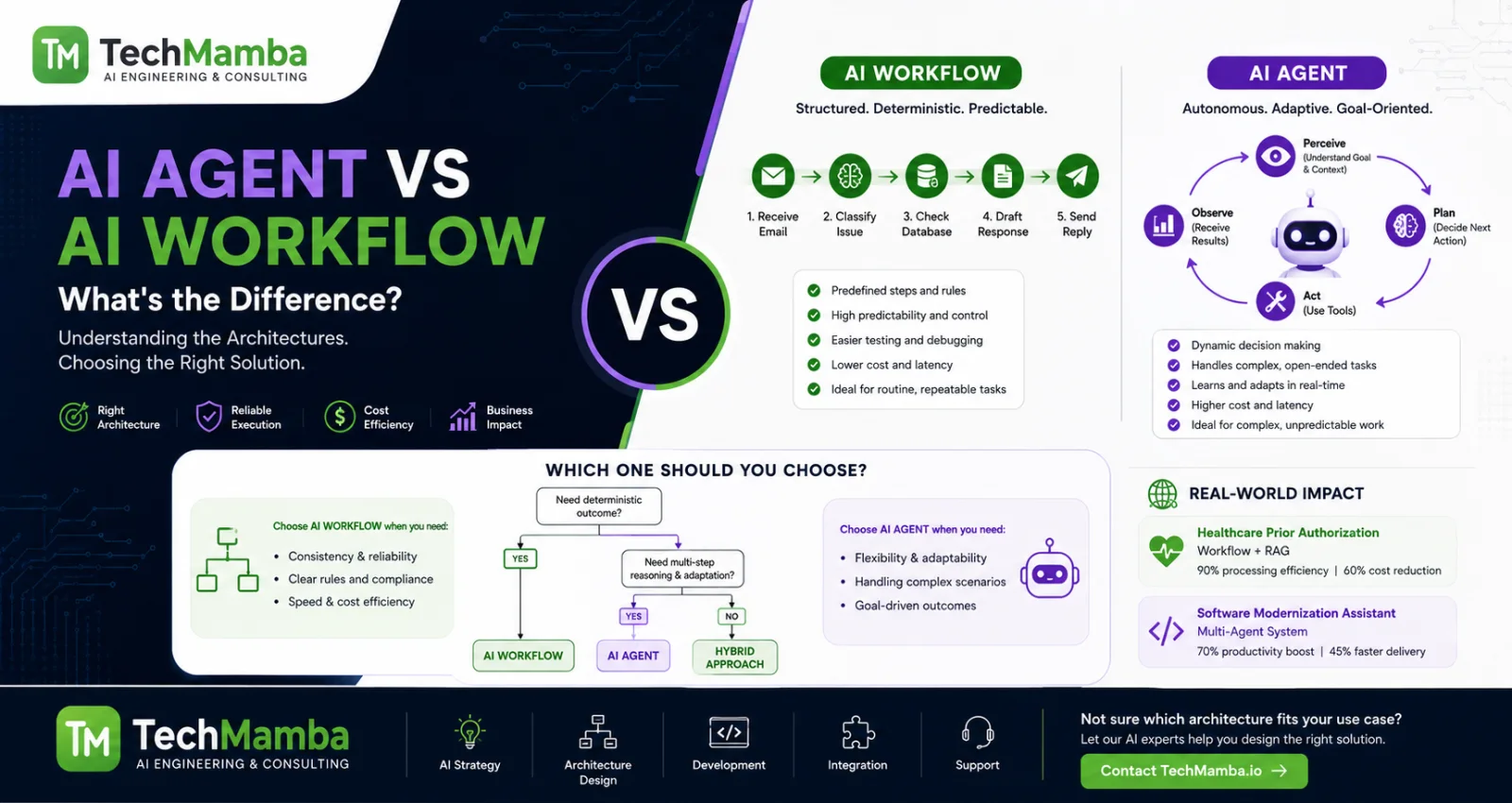
Imagine you are building a customer support system for a growing e-commerce platform. A customer emails: "My order hasn't arrived, and I want a refund." If you build an AI Workflow, you write a step-by-step program. The system reads the email, classifies it as a delivery issue, checks the shipping database, extracts the tracking number, and drafts a status update. The path is locked down, predictable, and fast.
Now, imagine you deploy an AI Agent. You don't give it a step-by-step script. Instead, you give it a goal: "Resolve this customer's issue according to our corporate policy." You provide it with a collection of tools—access to the shipping database, the billing system, and a communications gateway. The agent inspects the order, realizes the package was lost by the carrier, opens an internal ticket with logistics, updates the customer, and dynamically checks back later to issue the refund once approved.
The generative AI landscape has shifted from a race of pure generation to an era of execution. Organizations are moving past simple chatbots to automate complex, multi-tiered operations. Yet, choosing the wrong architecture between a workflow and an agent can lead to unpredictable runtime behavior, fragile systems, or runaway cloud bills.
This comprehensive guide clarifies the differences between AI Workflows and AI Agents. We will unpack their underlying architectures, analyze core design patterns, evaluate framework options, and establish a production decision framework to help your engineering teams build reliable, scalable AI systems.
1. The Core Paradigm: Who Controls the Execution Flow?
To understand the difference between an AI Workflow and an AI Agent, we must look past the industry hype and ask a fundamental software engineering question: Who controls the next step of execution?
The Structural Axis: Predictability vs. Autonomy
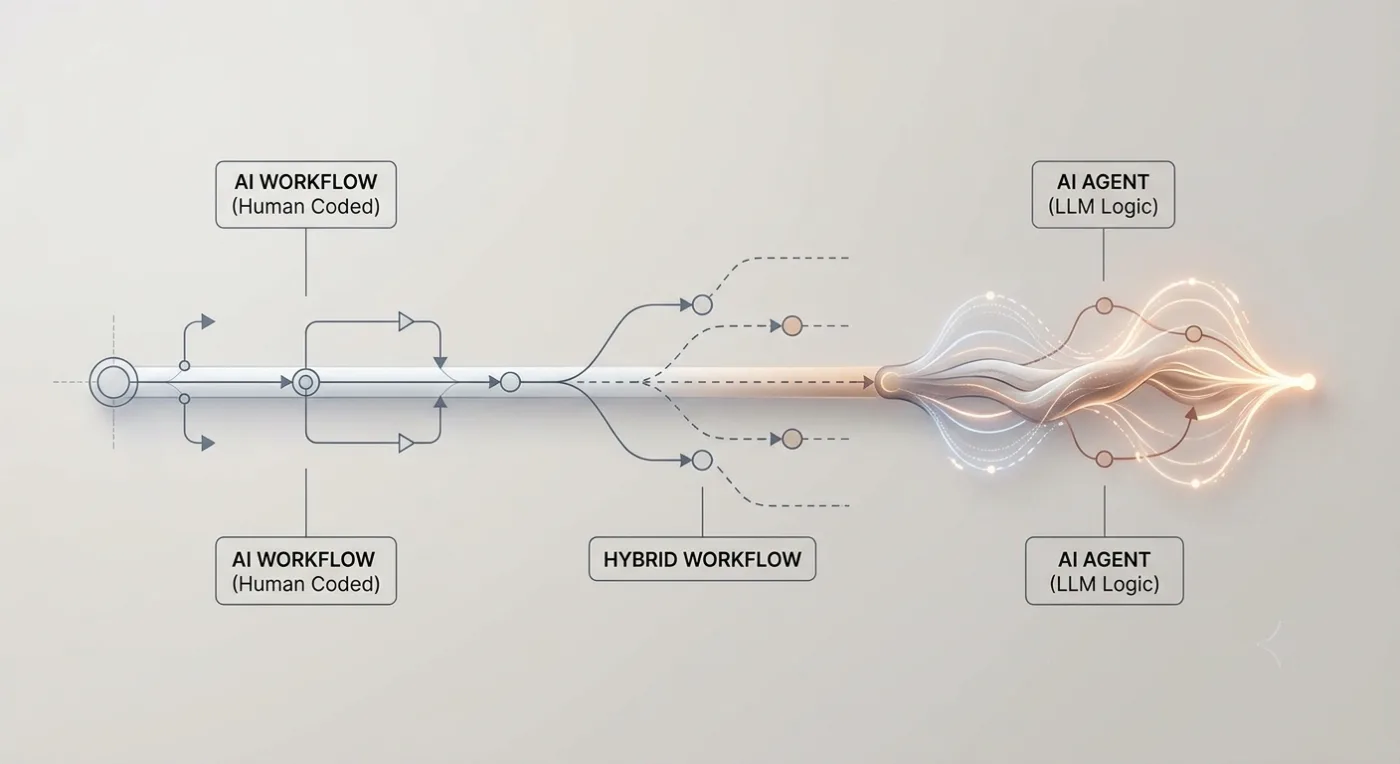
The defining difference between a workflow and an agent is not the presence of an LLM or an external tool. It is who drives the control flow.
Visual Description: A horizontal gradient axis demonstrating the architectural spectrum from purely deterministic, human-coded execution (Linear Prompt Chaining) transitioning through hybrid routing graphs to fully autonomous, dynamic LLM-driven loops.
What is an AI Workflow?
An AI Workflow is a system where the sequence of steps and tools is orchestrated through predefined code paths written by a human developer.
While a Large Language Model (LLM) sits inside one or more steps of this pipeline—acting as an intelligent data processor, classifier, or translator—it does not decide what function to execute next. The control flow is deterministic, explicitly defined via conditional logic, state machines, or Directed Acyclic Graphs (DAGs).
-
Core Characteristic: High predictability, explicitly bounded paths, and fixed execution topologies.
-
Analogy: An assembly line. Raw materials move from Station A to Station B to Station C. Station B might use an advanced robotic arm (the LLM) to weld a complex joint, but that robot doesn't decide to skip Station C and ship the car directly to the dealer.
What is an AI Agent?
An AI Agent is an autonomous system where the LLM dynamically directs its own execution path, tool usage, and loop iterations to achieve a high-level goal.
Instead of following a hardcoded path, the agent operates within a Reasoning-Acting loop. Given an objective, the agent evaluates its current context, selects a tool, inspects the tool's output, updates its internal state, and decides whether it needs to take another action or deliver the final answer to the user.
-
Core Characteristic: Dynamic decision-making, runtime non-determinism, and emergent execution paths based on environmental feedback.
-
Analogy: A skilled project contractor. You give them a goal ("Renovate the kitchen by Friday"), a budget, and access to a toolbox. You don't script every swing of their hammer; they inspect the layout, encounter unexpected plumbing issues, adapt their plan, select the appropriate tools, and work until the job is complete.
2. Five Core AI Workflow Patterns
Modern business applications favor AI Workflows because they adapt traditional software engineering methodologies to probabilistic AI models. By wrapping LLM calls inside hardcoded pipelines, developers enjoy the reasoning power of generative models without sacrificing auditability, safety, or strict Service Level Agreements (SLAs).
In their foundational engineering analysis, researchers at Anthropic categorized the core structural patterns that power production AI systems. Five of these patterns form the backbone of structured AI workflows.
Pattern 1: Prompt Chaining
Prompt chaining breaks a complex, monolithic task down into a sequential series of discrete, easier LLM calls. The output of Step N serves as the direct input for Step N+1. Programmatic validation gates are injected between steps to verify data quality before continuing execution.
-
Use Case: Structured content generation (e.g., Input raw financial transcript → Step 1: Extract key metrics → Validation: Ensure all figures match regulatory constraints → Step 2: Generate executive narrative → Step 3: Format to compliance markdown).
-
Trade-off: Increases total user latency due to sequential model invocations, but drastically increases accuracy and reduces the hallucination rate of complex tasks.
Pattern 2: Routing
A routing workflow uses a classifier (which can be a hardcoded keyword match, a small fine-tuned classification model, or an LLM) to evaluate an incoming request and direct it to a specialized downstream processing branch.
-
Use Case: Omni-channel customer support ticket handling. An incoming email is analyzed. If classified as "Billing Dispute," it routes to a pipeline with secure database tools for ledger access. If classified as "Technical Bug," it routes to an engineering log retrieval pipeline.
-
Trade-off: Adds an initial latency overhead for classification, but optimizes downstream token spend and accuracy by using highly specialized, lightweight prompts and specialized toolsets.
Pattern 3: Parallelization
Parallelization splits a task into multiple sub-operations that execute concurrently. This pattern manifests in two distinct operational forms:
-
Sectioning: Breaking a large document or dataset into independent chunks, processing each chunk simultaneously through the same or different LLM calls, and then programmatically combining the results.
-
Voting: Running the exact same prompt through multiple instances of an LLM simultaneously (often with a high temperature setting) to capture a distribution of responses, using an algorithmic filter or separate LLM grader to select the best output.
-
Use Case: Large-scale contract analysis. Sectioning allows a 300-page lease agreement to be analyzed for compliance liabilities across 10 different sections at once, trimming processing times from minutes to seconds.
-
Trade-off: Substantially increases peak token throughput requirements, but reduces overall wall-clock latency while providing explicit structural redundancy.
Pattern 4: Orchestrator-Workers
The Orchestrator-Worker pattern utilizes a central LLM to dynamically break down a broad prompt into a structured list of sub-tasks. The orchestrator then hands off these sub-tasks to independent worker nodes (which can be fixed programmatic scripts or individual LLM steps). The orchestrator collects all worker responses and synthesizes them into a unified final output.
-
Use Case: Code generation across multi-file repositories. The orchestrator looks at a feature request, determines that file
A.py,B.py, andREADME.mdmust be modified, creates three separate worker tasks to execute those exact edits, and merges the code structural changes cleanly. -
Trade-off: Highly effective for tasks where the sub-steps are unpredictable at design time, but requires a highly capable (and expensive) foundation model to act as the central orchestrator to avoid coordination failures.
Pattern 5: Evaluator-Optimizer
The Evaluator-Optimizer pattern is a structured, deterministic loop combining two distinct roles: a generator that produces a draft output, and an evaluator that measures that output against a strict set of rubrics, test suites, or corporate compliance constraints. If the evaluator flags a failure, the draft is returned to the generator alongside explicit, contextual feedback for iterative refinement.
-
Use Case: Regulatory document drafting or automated test-driven software generation. The generator writes code; an automated test suite runs the code. If the tests fail, the compiler logs and error outputs are fed back to the generator to fix the bug. This loop repeats until the criteria are satisfied or a max loop limit is hit.
-
Trade-off: High token consumption and increased execution time per request, but delivers highly verifiable, production-grade outputs.
Technical Blueprint: A Deterministic Workflow in Practice
To see how a deterministic workflow operates under the hood, consider this compact implementation of an Evaluator-Optimizer pattern using Python. Note that the control flow loop is governed completely by native Python code, not by the LLM itself.
Python
import os, json
from openai import OpenAI

client = OpenAI(api_key=os.environ.get("OPENAI_API_KEY"))

def run_compliance_workflow(user_intent: str, max_iterations: int = 3) -> str:
    """Orchestrates the workflow execution path deterministically via Python loops."""
    current_feedback = ""

    for iteration in range(max_iterations):
        # 1. Generator Node (Generate/Optimize Draft)
        prompt = f"Write a professional product description for: {user_intent}"
        if current_feedback:
            prompt += f"\n\nOptimize draft based on this compliance feedback: {current_feedback}"

        draft = client.chat.completions.create(
            model="gpt-4o-mini",
            messages=[{"role": "user", "content": prompt}]
        ).choices[0].message.content

        # 2. Evaluator Node (Strict Compliance Validation)
        audit = client.chat.completions.create(
            model="gpt-4o-mini",
            messages=[{"role": "user", "content": f"Return JSON {{'passed': bool, 'feedback': 'str'}}. Audit this tech copy for exaggerated claims like '100% unbreakable': {draft}"}],
            response_format={"type": "json_object"}
        )

        result = json.loads(audit.choices[0].message.content)
        if result.get("passed"):
            return draft  # Workflow exits on explicit success condition

        current_feedback = result.get("feedback")

    return f"FALLBACK_ERROR: Manual review required. Last draft: {draft}"
3. Deep Dive: AI Agents
While workflows excel at automation within known parameters, they struggle when dropped into open-ended, fluid environments where the exact sequence of events cannot be anticipated by developers. This is where AI Agents step in.
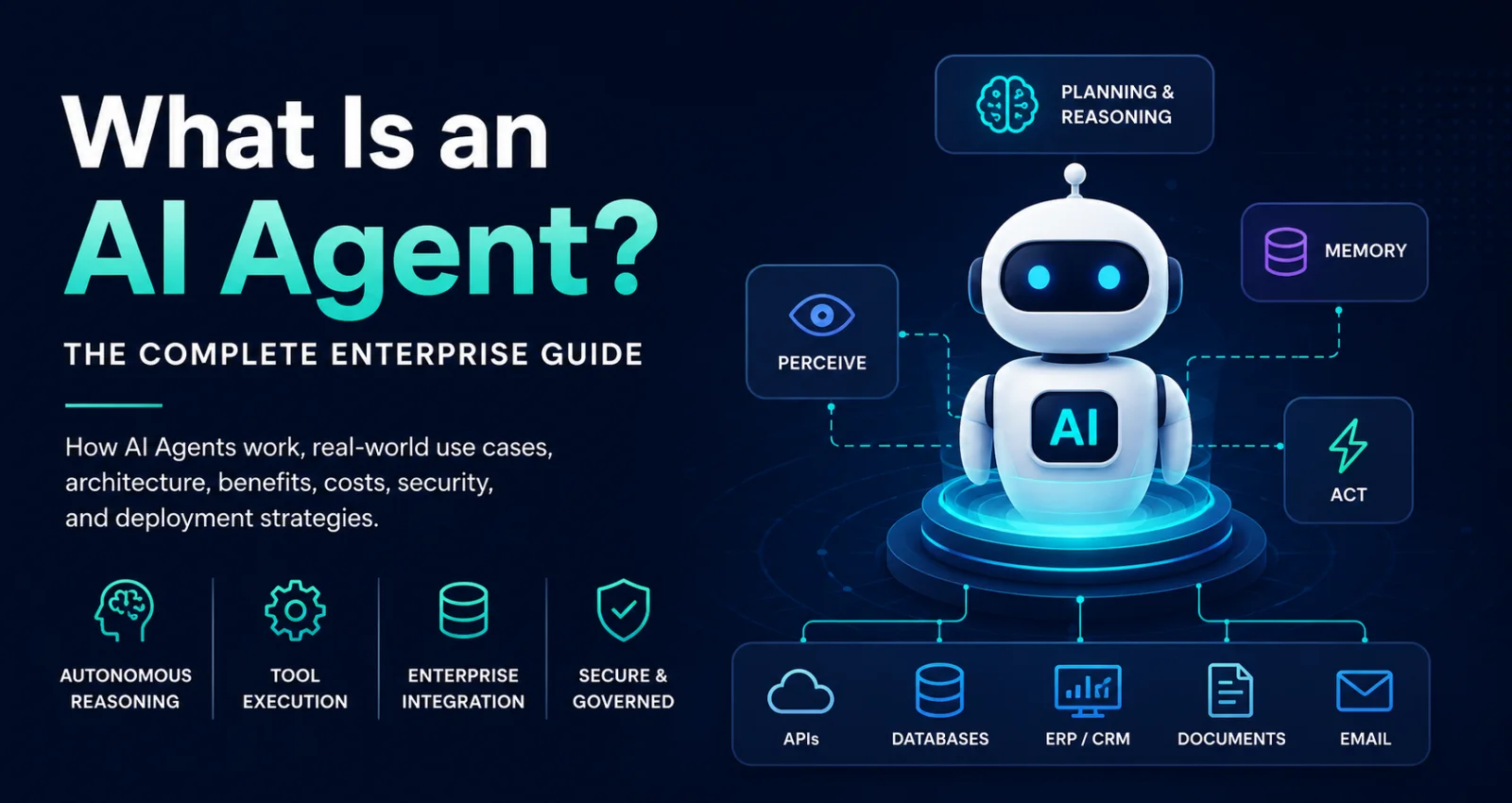
Think of an AI agent like a junior employee. You don't tell them every single click to make—you give them an objective. They decide which tools to use, check the results, and continue iterating until the work is done. An AI Agent is architected as an autonomous engine governed by a continuous cycle of observation, planning, decision-making, and action.
The Architectural Blueprint of an Agent
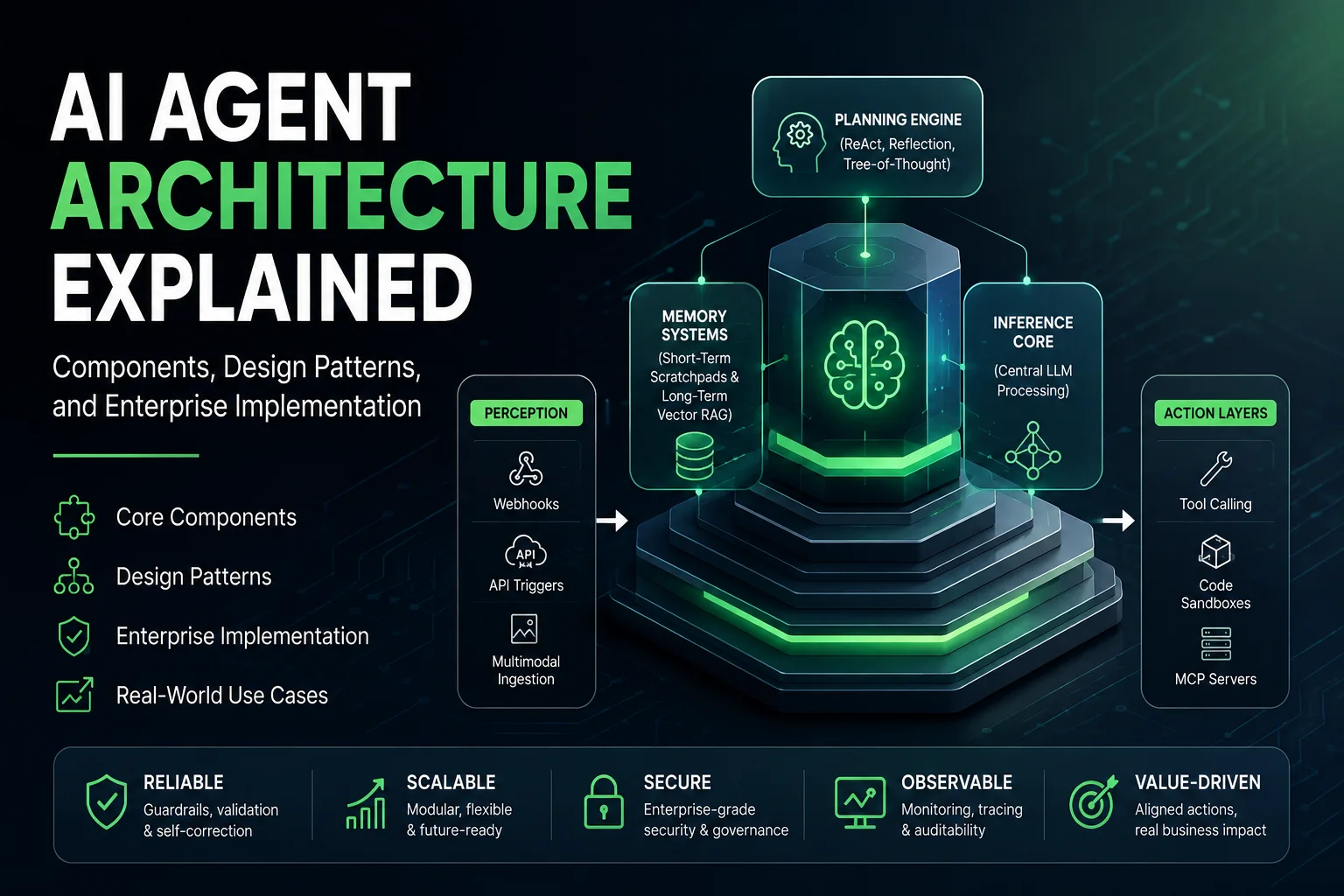
An engineering-grade autonomous agent comprises four core architectural components:
-
The Environment: The external sandbox, operating space, or application layer the agent is exposed to. For a customer service agent, this is the Zendesk ticketing system and API gateway. For a data analyst agent, this is a read-only PostgreSQL database instance. Learn more about how this connects in our breakdown of What Is an AI Agent?.
-
Tools (Agent-Computer Interfaces - ACI): The APIs, functions, or execution wrappers provided to the agent, allowing it to modify or query its environment. Crucially, tools must be documented with explicit parameters and edge-case exceptions so the LLM understands when and how to call them using emerging frameworks like the Model Context Protocol (MCP) Explained.
-
Memory Systems:
-
Short-term Memory: The execution trace and window of the current conversation or task trajectory (managed inside the context window).
-
Long-term Memory: External persistent storage (often using a vector database like Pinecone, Milvus, or pgvector) that enables the agent to pull historic interactions, preferences, or organizational knowledge bases across distinct multi-day execution loops.
-
-
The Core Model & System Prompt: The foundational reasoning engine (typically a frontier model optimized for tool use, such as Claude 3.5 Sonnet or GPT-4o). The system prompt does not specify a step-by-step path; instead, it establishes the roles, high-level objectives, explicit tool execution schemas, and stop conditions. For architectural details, review our guide on AI Agent Architecture Explained.
The Anatomy of an Agent Execution Loop
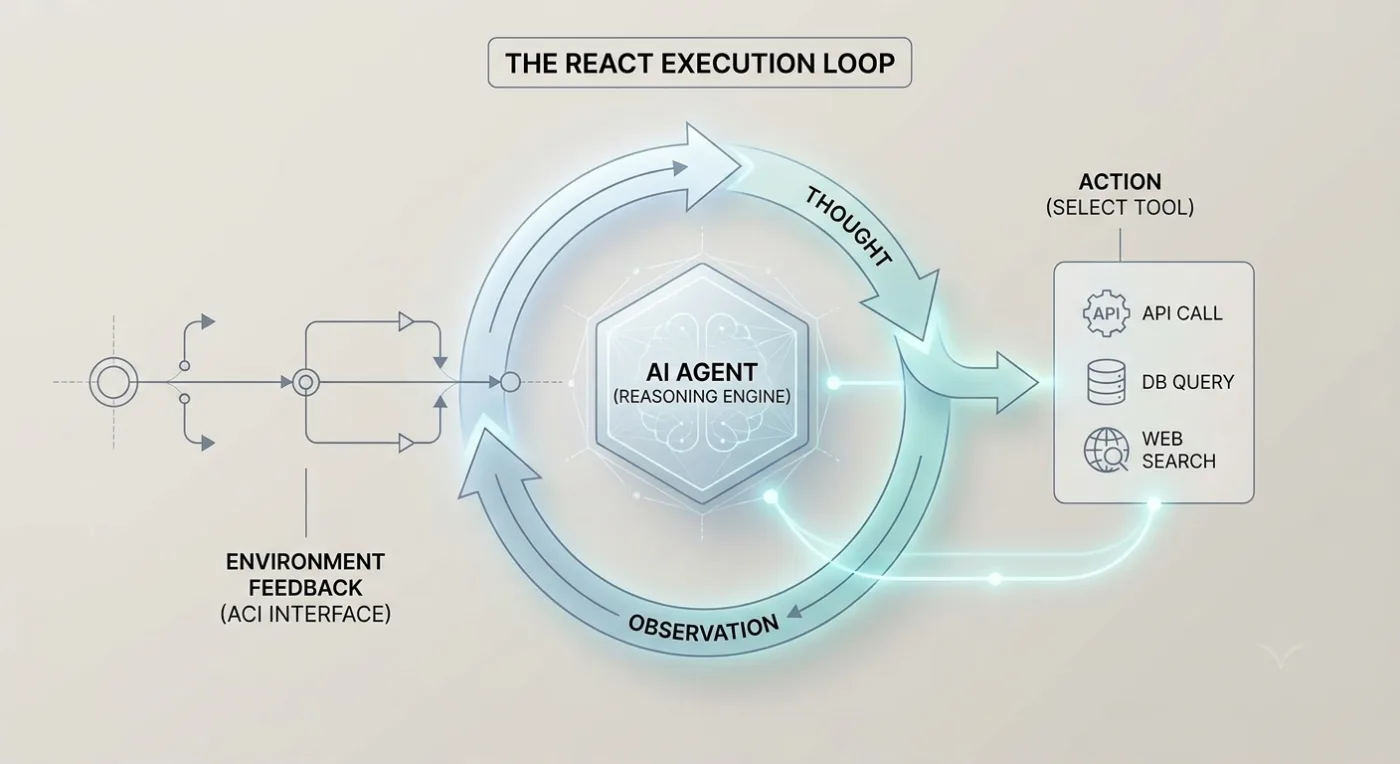
The engine of an autonomous agent is the ReAct (Reason + Act) paradigm. When an agent receives an abstract query, it processes it through a strict internal loop:
Thought → Action → Observation → Loop/Reflect
-
Thought: The LLM generates a reasoning step, analyzing its progress toward the ultimate objective and evaluating the previous observation.
-
Action: The LLM selects and outputs a structured tool call command (e.g., calling a specific JSON RPC method or database lookup).
-
Observation: The underlying application framework interceptor catches the tool call, executes the underlying programmatic script, obtains the real-world result (ground truth from the environment), and injects that result back into the model's context window.
-
Next Turn: The model processes this new environmental reality and either fires another tool call or determines that it has successfully completed the objective, emitting its final text response.
Visual Description: A circular lifecycle blueprint illustrating the ReAct sequence. Arrows cycle through Thought (LLM internal reasoning) -> Action (JSON parameter emission) -> Observation (API environment execution execution trace) -> Loop/Reflect (Context window appending).
Technical Blueprint: An Autonomous ReAct Loop
To demonstrate the architectural shift, here is a compact implementation of an autonomous agent loop. Notice how the control flow loop is dynamic: the LLM explicitly determines when to call a tool, which tool to pick, and when to break out of the loop based on the runtime values it encounters.
Python
import os, json
from openai import OpenAI

client = OpenAI(api_key=os.environ.get("OPENAI_API_KEY"))
TOOLS_SCHEMA = [{"type": "function", "function": {"name": "fetch_user_tier", "description": "Get subscription tier", "parameters": {"type": "object", "properties": {"uid": {"type": "string"}}, "required": ["uid"]}}}]

def run_autonomous_agent(user_objective: str) -> str:
    """Runs an autonomous agent loop allowing the LLM to dynamically drive execution paths."""
    messages = [
        {"role": "system", "content": "You are an autonomous agent. Resolve objectives using tools. When complete, answer directly."},
        {"role": "user", "content": user_objective}
    ]

    for turn in range(5):
        response = client.chat.completions.create(
            model="gpt-4o-mini", messages=messages, tools=TOOLS_SCHEMA, tool_choice="auto"
        ).choices[0].message

        messages.append(response)
        if not response.tool_calls:
            return response.content  # Agent exits autonomously when it decides it's done

        for tool_call in response.tool_calls:
            print(f"[Agent Tool Execution] Model requested: {tool_call.function.name}")
            # Dynamic execution fallback simulation
            observation = json.dumps({"uid": "usr_9921", "tier": "Enterprise Platinum"})
            messages.append({"role": "tool", "tool_call_id": tool_call.id, "name": tool_call.function.name, "content": observation})

    return "Agent execution terminated: turn limit exceeded."
4. Operational Trade-offs: Latency, Cost, and Predictability
Deploying production AI applications requires balancing performance, economics, and business metrics. Workflows and agents behave differently under production loads, which directly impacts your total cost of ownership (TCO) and customer experience.
Latency Profiles
-
AI Workflows (300ms – 800ms): Because workflows navigate fixed paths, they optimize latency through parallelization and lightweight models. They are built for real-time application responses and strict user interface SLAs.
-
AI Agents (2,000ms – 10,000ms+): An agent functions through sequential reasoning cycles. Each step requires a model call to evaluate the environment before executing the next tool. This multi-turn processing makes agents unsuitable for synchronous, real-time user experiences, but highly effective for background asynchronous tasks.
Cost Dynamics
-
AI Workflows ($0.01 – $0.10 per transaction): Workflows allow developers to optimize costs. You can route simple tasks to highly performant, lower-cost models like GPT-4o-mini or Llama-3-8B, keeping token usage predictable.
-
AI Agents ($0.10 – $2.00+ per transaction): Agents require advanced frontier models (such as Claude 3.5 Sonnet) to successfully navigate complex reasoning steps and interpret tool parameters. Combined with long interaction traces, a single abstract objective can trigger an expensive sequence of token consumption.
5. Head-to-Head Comparison: Workflows vs. Agents
| Feature / Dimension | AI Workflow | AI Agent |
| Control Flow Driver | Human Developer via code (Deterministic) | LLM Model via internal reasoning loops (Probabilistic) |
| Execution Path | Fixed at compile-time. Known graph boundaries. | Emergent at runtime. Variable turn and step depth. |
| Primary Advantage | Maximum reliability, auditability, low variance. | Infinite adaptability, handles unstructured environments. |
| Primary Risk | Brittle when encountering unforeseen data shapes. | Hallucination loops, runaway token costs, unbounded behavior. |
| Ideal For | High-volume, repeatable, compliance-heavy ops. | R&D, interactive coding, highly exploratory data parsing. |
| Debugging Complexity | Low; standard stack traces and logging tools. | High; requires tracing semantic trajectories and prompts. |
| Orchestration Tooling | LangGraph, Temporal, AWS Step Functions | CrewAI, AutoGen, LangGraph (Agent Loops) |
6. Framework Ecosystem: Choosing Your Orchestration Stack
Selecting the right framework is crucial for your development stack. Different frameworks prioritize either strict control structures or dynamic agent operations.
| Framework | Workflow Support | Agent Support | Multi-Agent Orchestration | Learning Curve | Best Team Size |
| LangGraph | ⭐⭐⭐⭐⭐ | ⭐⭐⭐⭐⭐ | ⭐⭐⭐⭐ | Steep | 3+ Developers |
| CrewAI | ⭐ | ⭐⭐⭐⭐ | ⭐⭐⭐⭐⭐ | Medium | 1-3 Developers |
| AutoGen | ⭐ | ⭐⭐⭐⭐ | ⭐⭐⭐⭐⭐ | Steep | R&D Teams / Labs |
| OpenAI Agents SDK | ⭐⭐ | ⭐⭐⭐⭐ | ⭐⭐ | Low | Solo / PoC |
How the Frameworks Align
-
LangGraph: Developed by the LangChain team, LangGraph models applications as stateful graphs. It has a steeper learning curve but remains the premier tool for building both deterministic AI workflows and dynamic agent loops because it forces developers to define explicit transitions while still permitting runtime loop choices.
-
CrewAI / AutoGen: These frameworks are optimized for multi-agent systems where multiple specialized agents communicate with one another to solve a problem. They excel at automated operations like software development teams or research operations, but can be more challenging to restrict to strict, linear pipelines.
7. Common Misconceptions in Real-World AI
As companies rush to adopt AI, several costly misconceptions have emerged in product design meetings and engineering architectures.
Misconception 1: "AI Agents are inherently better than AI Workflows"
This is the most common industry misconception. Many engineering teams start building complex autonomous agent loops only to realize they could have achieved higher reliability, lower latency, and lower token costs using a simple structured prompt chain or routing workflow. Autonomy is a trade-off, not an upgrade.
Misconception 2: "Workflows are rigid and outdated"
Some assume that because a workflow is coded with explicit paths, it lacks the flexibility of modern software engineering. In reality, a well-designed workflow leverages the model's reasoning capabilities within every single node. The model can still parse unstructured text, handle language nuances, and extract insights; the surrounding code simply ensures that the business process remains secure and controlled.
Misconception 3: "Every conversational chatbot is an AI Agent"
Most business chatbots are guided by deterministic workflows or basic retrieval-augmented generation (RAG) structures. If a chatbot follows a hardcoded decision tree to answer questions based on a vector database search, it is a workflow. It only becomes an agent if the model autonomously selects which tools to call and dynamically determines its own execution steps to achieve an open-ended goal.
Misconception 4: "Autonomous agents don't need RAG"
Some assume that large context windows eliminate the need for retrieval systems. However, feeding huge amounts of unindexed data directly into an agent's context window increases token costs, slows processing times, and raises the likelihood that the model misses key information. Modern agents rely heavily on RAG Development and Agentic RAG Architecture to search internal knowledge bases efficiently.
8. Build vs. Don't Build: When to Restrict Autonomy
To avoid over-engineering your AI systems, use this strict boundary framework to determine when to build a deterministic workflow versus an autonomous agent.
When You Should NOT Build an AI Agent (Use a Workflow Instead)
-
FAQ Chatbots: Systems answering from a defined knowledge base should use a standard RAG Architecture Explained workflow. Giving a bot tool-use autonomy here only introduces hallucination risks.
-
Structured Form Filling & OCR Pipelines: Extracting variables from invoices, receipts, or medical charts follows strict data schemas. This is best executed via parallelized or chained workflows using structured outputs.
-
Deterministic Email & Ticket Classification: Routing support requests to specialized queues based on intent or sentiment requires a straightforward classification router, not a multi-turn reasoning loop.
When You SHOULD Build an AI Agent
-
Open-Ended Multi-Step Research: Tasks requiring an AI to search the web, evaluate source credibility, modify search queries based on initial findings, and compile a comprehensive report.
-
Autonomous Debugging & Code Patching: Systems that can write code, execute it inside an isolated sandbox, read the compiler or test traces, and iteratively modify the source code until all validation suites pass.
-
Dynamic Multi-Tool Scheduling & Planning: Operations where the system must interact with fluctuating calendar APIs, travel reservation portals, and budget tools concurrently, re-adjusting plans dynamically when conflicts occur.
9. Architectural Recommendation Blueprint
To anchor these concepts to common software requirements, use this matrix to match your business need with the optimal runtime architecture.
| Business Need | Recommended Architecture | Key Component / Guardrail |
| Customer Support Ticket Handling | Workflow + RAG | Intent Router to prevent out-of-bounds actions. |
| Internal Knowledge Discovery | RAG Workflow | Semantic text search paired with structured data sources. |
| Interactive Code Assistant | AI Agent | Code generation model with human-in-the-loop review. |
| Legacy Code Modernization | Multi-Agent System | Isolated execution sandboxes with test runners. |
| Automated Invoice Processing | Prompt Chaining Workflow | Strict schema validation via structured JSON parsing. |
| Deep Competitive Research | Bounded Autonomous Agent | Time-bounded search tool arrays and token circuit breakers. |
| Cross-System Logistics Syncing | Hybrid Architecture | Core workflow handles rules; Agent resolves API exceptions. |
10. Enterprise Decision Framework: Which Architecture to Choose?
To guide engineering teams from prototype to production, use this visual and mathematical scoring matrix across four distinct operational vectors.
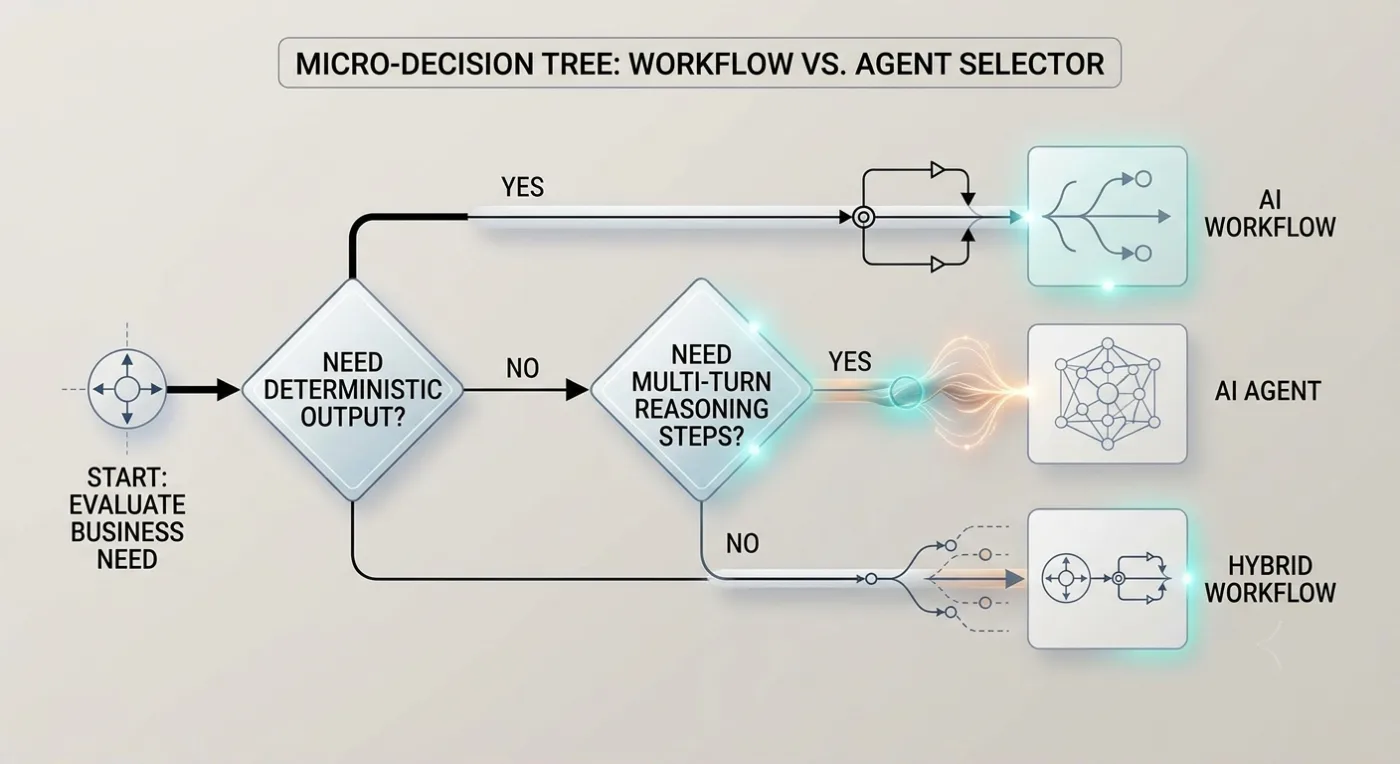
The Micro-Decision Tree
Need Deterministic Output?
➡️ Yes: Deploy an AI Workflow
➡️ No: Proceed to step 2.
Need Multi-turn Reasoning/Tool Steps?
➡️ Yes: Deploy an AI Agent
➡️ No: Deploy a Hybrid Workflow
The 4-Point Evaluation Matrix
1. Predictability and SLA Requirements
-
Rule: If your business operations demand hard compliance boundaries, repeatable audit trails, or fixed end-to-end processing SLAs (e.g., processing medical claims or generating compliance documents), choose an AI Workflow (+2 Workflow).
-
Rule: If the goal is open-ended or variable, and you can tolerate structural divergence (e.g., deep automated web research or dynamic software patch generation), choose an AI Agent (+2 Agent).
2. Input/Environment Predictability
-
Rule: If the shapes of incoming inputs and boundary conditions are known at design time, a routing state machine is optimal. Choose an AI Workflow (+2 Workflow).
-
Rule: If the data landscape is highly unpredictable, with infinite real-world permutations where hardcoded conditional code paths would lead to an unmanageable explosion of
if/elsestatements, choose an AI Agent (+2 Agent).
3. Verifiability of Results
-
Rule: Autonomous agents require a programmatic way to verify if their actions are succeeding or failing. If your environment allows for objective validation (e.g., a sandboxed runtime where code execution outputs are checked by automated unit tests), an agent can self-correct effectively. Choose an AI Agent (+2 Agent).
-
Rule: If the output quality is subjective, requiring nuanced human context alignment at intermediate stages, choose an AI Workflow (+1 Workflow).
4. Total Cost of Ownership (TCO) and Token Budget
-
Rule: High-volume pipelines processing millions of daily transactions demand tight financial bounds. Workflows execute a minimal, predictable block of tokens per transaction. Choose an AI Workflow (+2 Workflow).
-
Rule: If your organization prioritizes solving a high-value business problem where paying $1.00 or $2.00 in execution tokens per transaction is easily justified by the return on investment (e.g., migrating a complex legacy software module), choose an AI Agent (+1 Agent).
Score Tally
-
Total Score leaning toward Workflow ≥ 4: Deploy an AI Workflow. It guarantees peace of mind, low token costs, and rock-solid architectural stability.
-
Total Score leaning toward Agent ≥ 4: Deploy an AI Agent. Ensure it runs within a heavily isolated environment with strict token boundaries.
11. Real-World Case Studies
Case Study 1: Transforming Medical Prior Authorization (Healthcare)
-
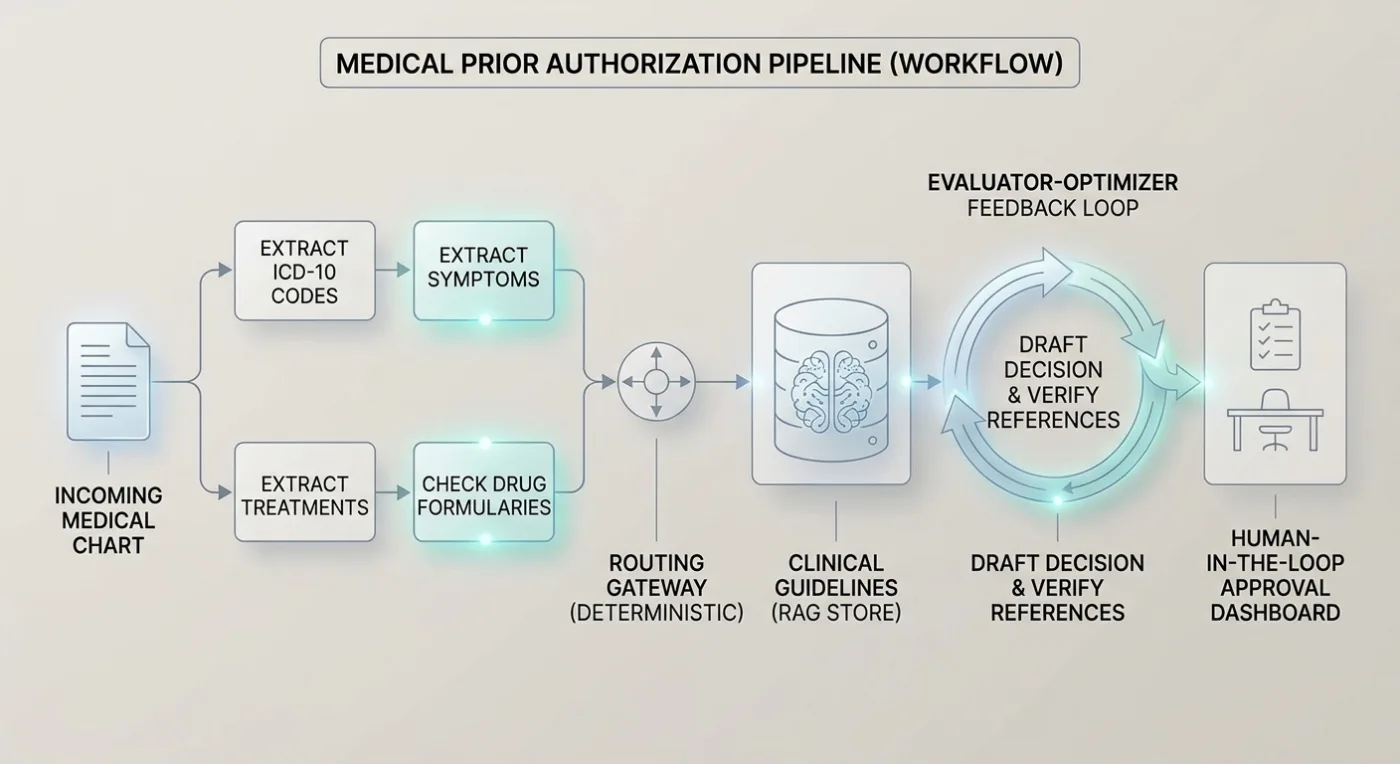
The Business Problem: A large healthcare insurance provider struggled with manual Medical Prior Authorization document processing. Medical clerks spent up to 45 minutes manually cross-referencing incoming patient charts against dense, multi-hundred-page corporate clinical insurance guidelines to determine coverage approvals.
-
The Existing Challenges: Hallucinations were unacceptable due to legal liabilities and patient care standards. The solution had to provide full audit trails, showing the exact sentence in the guideline document that justified the approval or denial decision.
-
The Solution Architecture: The engineering group bypassed autonomous agents entirely and deployed a deterministic Parallelized and Routed AI Workflow.
Visual Description: A multi-lane processing flowchart. Lane 1 shows concurrent clinical metric extraction blocks. Lane 2 routes variables to deep RAG knowledge stores. Lane 3 uses an Evaluator-Optimizer feedback loop before emitting a structured payload to a Human-in-the-Loop approval dashboard.
-
Technologies Involved: GPT-4o via secure infrastructure, LangGraph for graph orchestration, pgvector for high-performance RAG lookups, and Langfuse for deep execution path telemetry tracing.
-
Results Achieved: Average document review times plummeted from 45 minutes to under 90 seconds. Because the pipeline utilized a deterministic workflow model, hallucinations were effectively brought down to near 0%, and auditability was maintained at 100% since every model output was mapped to an exact, unalterable database document citation.
Case Study 2: Autonomous Software Modernization (Enterprise SaaS)
-
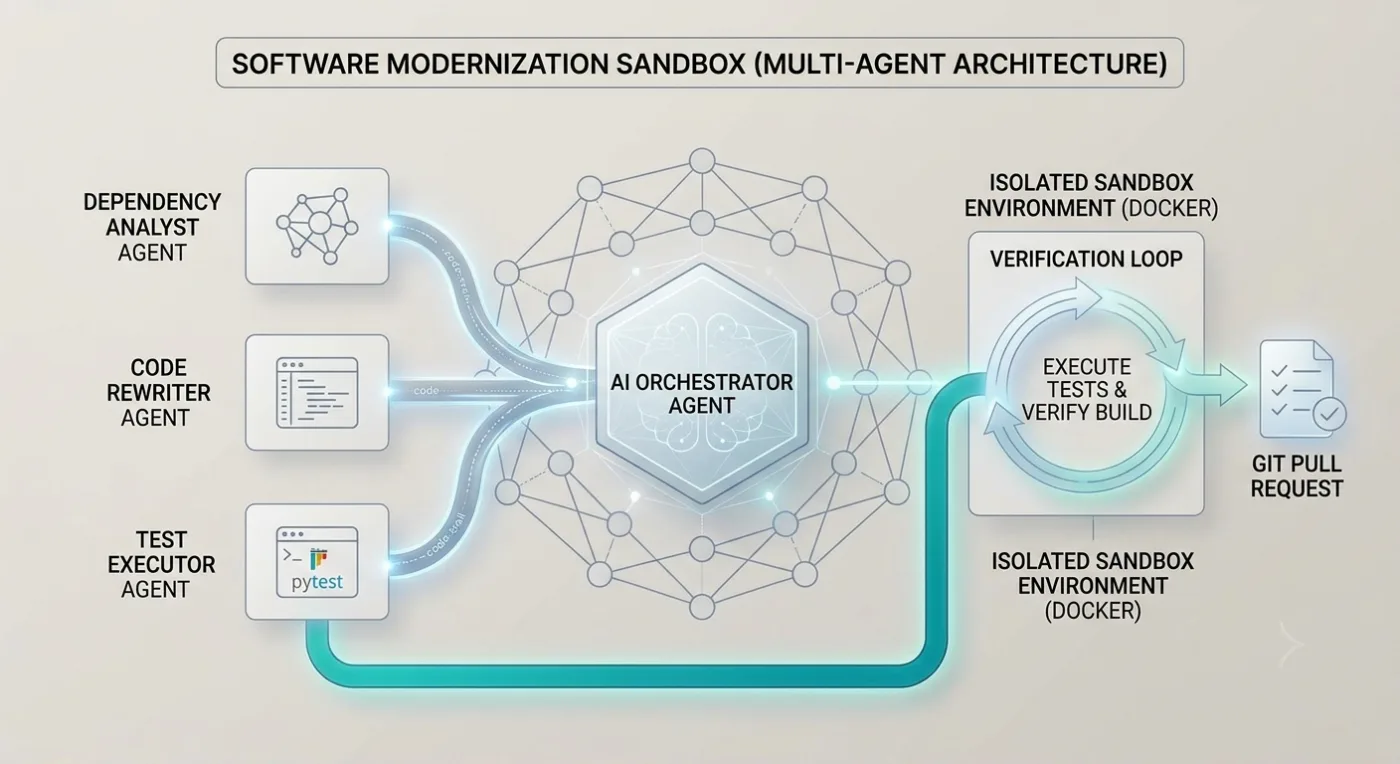
The Business Problem: A global SaaS enterprise possessed over 4,000 internal repository modules written in legacy Python 2.7 and older Java architectures that required systematic modernization to modern Python 3.11/Java 21 frameworks to eliminate corporate security compliance vulnerabilities.
-
The Existing Challenges: The sub-tasks involved were entirely unpredictable. A legacy codebase could contain hidden dependency structures, circular imports, broken internal testing scripts, or deprecated database drivers. Hardcoding an engineering workflow to handle every edge case was functionally impossible.
-
The Solution Architecture: The group implemented an Autonomous Multi-Agent System.
Visual Description: An isolated network perimeter containing an Orchestrator Agent delegating tasks to three specialized worker agents (Dependency Analyst, Code Rewriter, Test Executor). A feedback loop loops from a sandboxed test runner back to the rewriter agent.
-
Technologies Involved: Claude 3.5 Sonnet (leveraged for its code-generation profiles and advanced tool execution capacities), Docker containerization sandboxes, Git API endpoints, and custom tool definitions exposed via the Model Context Protocol (MCP).
-
Why This Architecture Was Chosen: The environment offered an objective, programmatic ground truth—the application compiler and unit test execution suites. The agent could safely write code, view standard shell outputs, reason about dependency errors, adjust its file edits, and iteratively self-correct inside an isolated environment without developer interaction.
-
Results Achieved: Over 78% of the legacy software modules were successfully updated and passed automated CI/CD validation suites without human intervention, reducing the engineering modernization project timeline by an estimated 14 months.
12. Production Pitfalls and How to Solve Them
Building AI applications locally is easy; scaling them to support high application traffic is notoriously difficult. Below are the hidden operational challenges that platform engineering groups face when running these systems at scale.
1. The Runaway Loop Death Spiral
An autonomous agent can easily get trapped in an infinite loop. For instance, if an API returns an unexpected 403 Forbidden error because of an expired credential, a poorly constrained agent might reason: "The lookup failed. Let me try running the tool again to see if it works." It executes the tool again, receives the same error, and repeats the cycle indefinitely, burning through your token budget.
To mitigate this, implement strict programmatic Circuit Breakers at the application container orchestration framework level. Never rely on the LLM to count its own iterations.
Hardcode a maximum step limit directly inside your execution runtime environment using frameworks like LangGraph to throw an exception and route to a human operator the moment an execution turn count exceeds a safe threshold.
2. Context Window Bloat
In multi-turn agent systems or long-chain prompt workflows, the entire interaction log (including tool definitions, JSON responses, and intermediate historical reasoning trajectories) is appended to the LLM's context window with every new step.
As the conversation progresses, token consumption scales quadratically. This behavior dramatically increases latency and overhead cost per request.
To maintain performance, deploy systematic State Condensation and Sliding Window Compilation. After a predefined number of execution turns, run an independent, asynchronous worker model task to summarize the historical transaction history into a compact semantic state block.
Flush out the raw, low-level execution logs from the active context window, retaining only the condensed summary block and the most recent tool outputs.
3. Fragile Tool Parameter Parsing
When an LLM attempts to interact with an enterprise API, it must output arguments that match your schema perfectly (e.g., matching strict formats like ISO 8601 timestamps or precise string enums).
If the model emits a minor syntax error—like leaving a trailing comma in a JSON object or returning an invalid date layout—your backend API gateway will throw a 400 Bad Request error, immediately crashing the process.
To defend your endpoints, use robust schema-enforcement frameworks like Pydantic or structured generation features (like OpenAI's Structured Outputs or Instructor) to enforce JSON schemas natively through model configurations.
If a parsing validation error occurs, intercept the exception and return a clean, helpful error message back to the model (e.g., "Error: Expected format YYYY-MM-DD, but you provided DD-MM-YYYY. Please correct the parameters and call the tool again.").
13. Enterprise Implementation Best Practices
To maximize your returns while minimizing technical debt, follow these core architectural guidelines when designing modern AI systems:
-
Start with Simplicity: Always apply the rule of architectural parsimony. Do not design an autonomous multi-agent system if a single, well-crafted prompt chaining workflow can reliably solve the problem. Simpler systems are easier to maintain, faster to execute, and cheaper to run.
-
Decouple System Prompts from Core Code: Never hardcode your core system prompts or complex agent tool instructions directly inside your application source code. Treat prompts as configurable assets. Manage them using an enterprise prompt registry or a GitOps-driven deployment workflow so updates can be rolled out, version-controlled, and A/B tested without needing full application restarts.
-
Enforce Complete Environment Separation: Never grant an autonomous AI agent direct, unmitigated access to production corporate databases, internal networks, or live write APIs. Run agent execution runtimes within heavily sandboxed, containerized environments. Enforce strict, read-only database connections, utilize narrow API gateway scopes, and apply robust role-based access control (RBAC) patterns to ensure the agent operates under the principle of least privilege.
-
The Tooling Paradox: The developer tooling and framework ecosystem is shifting rapidly, with major abstractions launching monthly. Focus on solid architectural design principles—such as explicit state preservation, strict data separation, and robust boundary control. These architectural fundamentals will consistently outlast individual framework lifecycles.
-
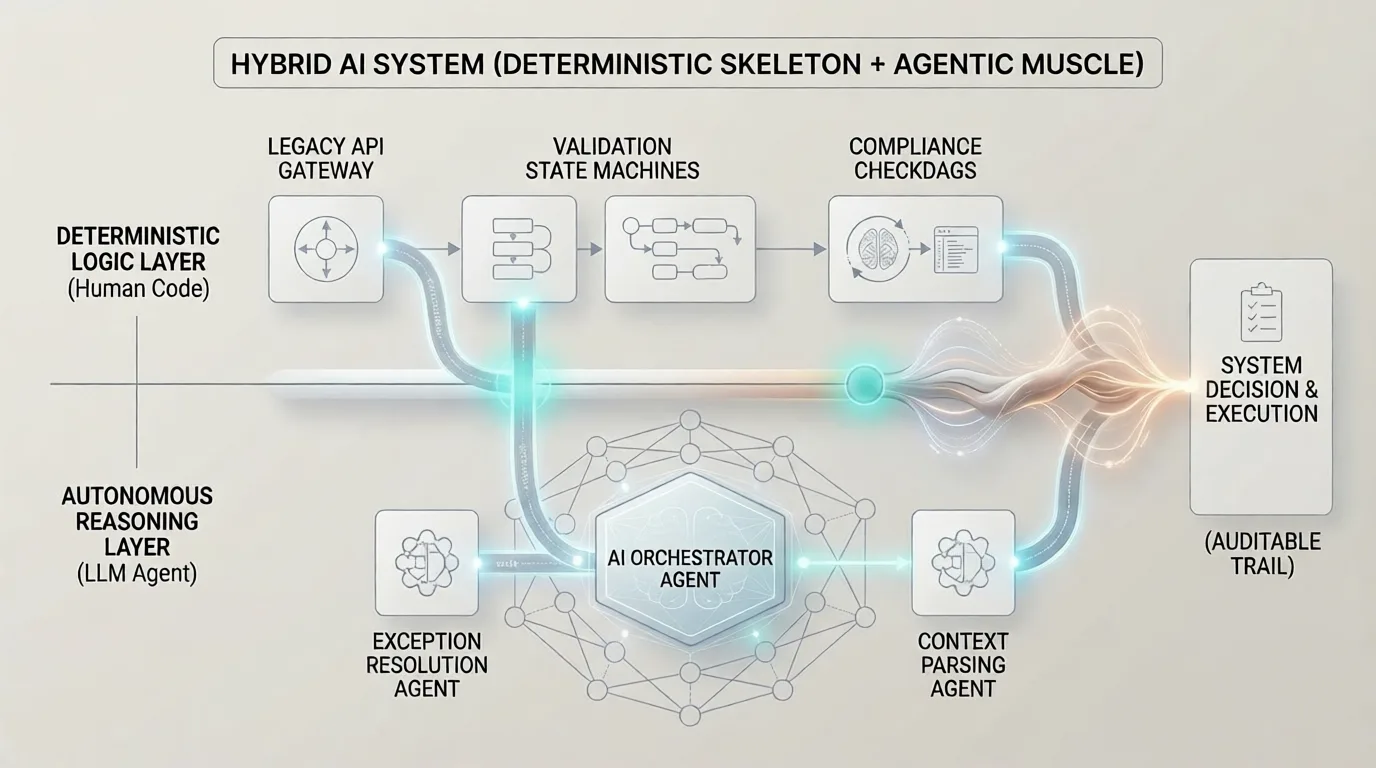
The Hybrid Ideal: The most successful software deployments leverage a hybrid architecture. Use a structured, dependable workflow to manage the primary business rules and high-level logic, but safely delegate ambiguous, open-ended sub-tasks to tightly constrained, specialized agents operating within bounded guardrails.
14. Conclusion and Future Outlook
The choice between an AI Workflow and an AI Agent is not a referendum on which technology is more advanced; it is a pragmatic engineering decision about matching the right architecture to your business requirements. As foundation models become faster, cheaper, and more adept at tool calling, the friction of running autonomous systems will decrease. However, the requirement for operational control remains absolute.
The industry is rapidly converging on the Hybrid Architecture model. In this setup, deterministic workflows serve as the foundational skeleton of a business process—guaranteeing corporate compliance, data routing safety, and explicit audit trails. Meanwhile, autonomous agents are deployed selectively within specialized nodes of that workflow to resolve non-deterministic friction points, such as resolving API exceptions or conducting deep context parsing.
By building with a clear understanding of the control axis, your engineering teams can design AI applications that are both infinitely flexible and fully reliable under production loads.
Optimize Your AI Architecture with TechMamba
Not sure whether your business use case demands a deterministic workflow, an autonomous AI agent, or a hybrid architecture? Our senior solutions engineers can help you evaluate the technical trade-offs and design an architecture that matches your performance, cost, and compliance requirements perfectly.
-
AI Agent Development: Build custom autonomous systems tailored to execute complex tasks safely in production.
-
AI Workflow Automation: Streamline your operations with robust, auditable, high-performance LLM pipelines.
-
LLM Application Development: Implement advanced engineering patterns to scale language models safely across your infrastructure.
-
AI Consulting Services: Work with our principal solution architects to evaluate your business requirements and select the optimal architecture.
Contact TechMamba Today to book an architectural deep dive with our core engineering team and turn your generative AI initiatives into sustainable operational advantages.