A SaaS team recently migrated dashboard mutations — project updates, invoice approvals, team invitations — from a REST API into Next.js Server Actions. The code got cleaner. Then a security review found that several actions checked whether a session existed but never checked whether that session belonged to someone allowed to touch the specific record being modified. Any authenticated user, in any organization, could approve any invoice given its ID.
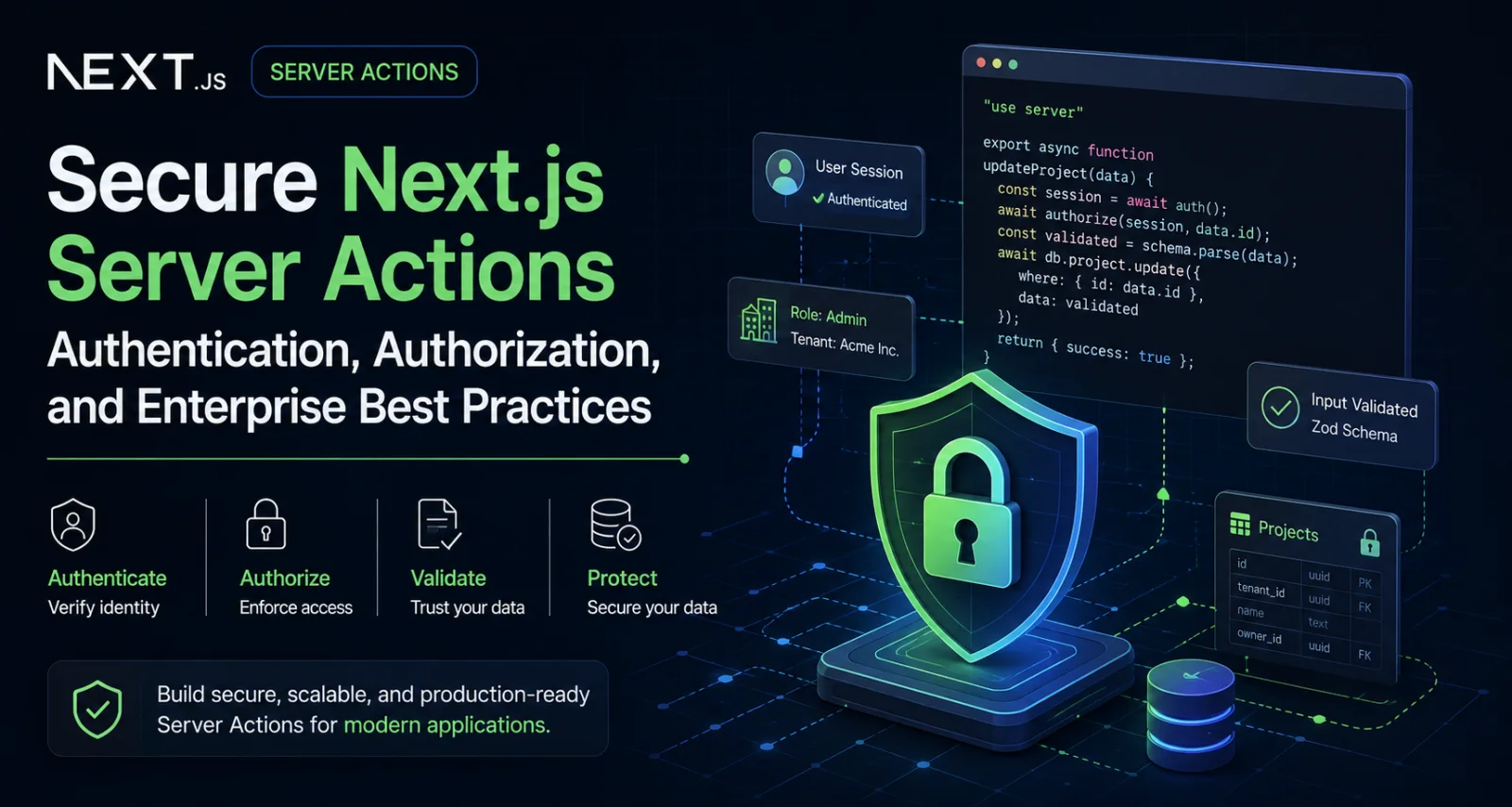
That happens because a mutation colocated with its UI starts to feel like a private helper function, even though it isn't one. This article treats Next.js Server Actions security as what it actually is: securing a real backend mutation endpoint. It covers what Next.js protects by default, what browsers and auth libraries handle, and what your application still has to implement — authentication, resource-level authorization, runtime validation, tenant isolation, abuse prevention, and auditable, transactional data access.
What Is a Next.js Server Action?
A Server Action is a React Server Function invoked through React's action mechanisms — <form action>, <button formAction>, or a startTransition-wrapped client call — marked with the "use server" directive at either the top of a function body or the top of a file (in which case every export in that file becomes a Server Action). Next.js serializes the client-supplied arguments, sends them over an internally generated POST request, executes the function server-side, and streams back the return value plus any re-rendered UI.
Server Actions can be invoked from a plain <form> for progressive enhancement, from client event handlers, from useEffect, or bound with .bind() to pre-supply arguments. None of these paths require the caller to originate from the component that originally imported the action — a client reference is reachable by anyone who can construct a matching request, not only from the button you rendered it under.
One subtlety worth knowing: Server Actions declared inline inside a component close over that component's render scope, and Next.js encrypts the serialized closure data with a per-build key so it isn't readable from the client bundle. That protects the confidentiality of closed-over values. It has no bearing on whether the caller is authorized to invoke the action with attacker-chosen arguments for anything not captured in the closure.
| Area | Server Actions | Route Handlers / APIs |
|---|---|---|
| Primary purpose | UI-connected server mutations | Reusable or externally consumed HTTP endpoints |
| Typical caller | Next.js application UI | Browser, mobile, partners, webhooks |
| Runtime validation | Required | Required |
| Authentication | Required for protected operations | Required for protected operations |
| Authorization | Required | Required |
| Public API contract | Usually not ideal | Appropriate |
| Third-party integration | Limited suitability | Better suitability |
Server Actions remove transport boilerplate — no manual fetch calls, route files, or serialization. They do not remove the backend responsibilities that boilerplate used to sit next to.
Server Actions vs. Route Handlers: Which Should You Use?
This decision comes up early in most real projects, so it's worth settling before diving into implementation details.
Server Actions fit authenticated dashboard mutations, form submissions that benefit from progressive enhancement, internal product operations, and workflows where the client and mutation logic live in the same Next.js app and evolve together.
Route Handlers (or a dedicated backend) fit better for public APIs, mobile app clients, partner integrations, webhook receivers, anything behind an API gateway with its own policy layer, long-lived contracts needing independent versioning, streaming responses, high-volume ingestion, and separate frontend applications that need to call the same backend logic.
| Use case | Better fit |
|---|---|
| Authenticated dashboard form | Server Action |
| Public REST/GraphQL API | Route Handler |
| Mobile app backend | Route Handler |
| Webhook receiver | Route Handler |
| Partner integration | Route Handler |
| Internal admin mutation | Server Action |
| High-volume data ingestion | Route Handler / dedicated service |
| Progressive-enhancement form | Server Action |
Neither option is inherently more secure — that's determined by whether authentication, authorization, validation, and data access are implemented correctly, not by which invocation mechanism is used. A Route Handler with the same missing ownership check as a vulnerable Server Action is exactly as exploitable; the vulnerability never lived in the transport layer.
A few situations are poor fits for Server Actions specifically: public APIs meant for external consumption (Server Actions aren't a stable, independently versioned contract), long-running processing and large file transfer (better handled by background jobs and signed uploads, covered later), and cross-platform clients where mobile and web would otherwise duplicate authorization logic across two different mechanisms. In those cases, reach for Route Handlers, a dedicated service, a job queue, or an API gateway — often alongside Server Actions for the parts of the app that remain UI-bound.
The Real Security Boundary
The security boundary is the same one every backend has: the point where client-controlled data enters server-side logic. Form fields, bound arguments, IDs, and even a client's claimed user ID or tenant ID are untrusted input — regardless of TypeScript types, which are compile-time only and impose no runtime constraint.
Three implications follow directly. Hidden UI controls are not access control — a conditionally rendered admin button says nothing about whether the underlying action checks role when invoked directly. Client-side validation is a usability feature, not a security boundary; it does nothing against a hand-built request. An authenticated session proves identity, not permission — confirming session.user.id exists doesn't confirm the caller owns the project or holds the required role. Record IDs, tenant IDs, roles, prices, and status values from the client must be re-verified against trusted server-side state before use.
A well-formed action moves through a consistent set of stages, even if the order of validation and authorization sometimes swaps depending on what's needed to look the resource up first:
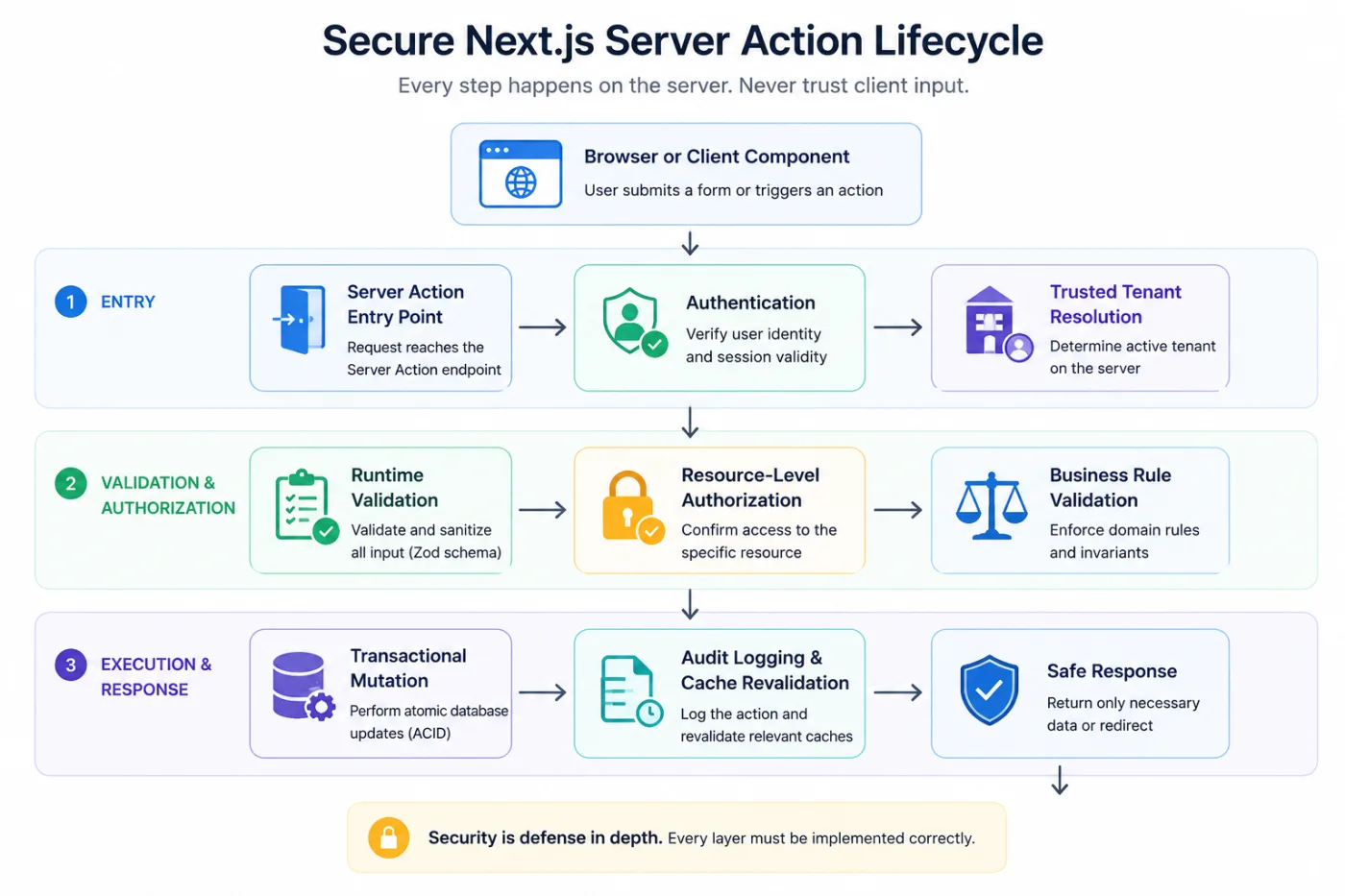
None of these stages are optional. Skipping one turns the action into an endpoint that trusts the client for a decision that belongs on the server.
Authentication vs. Authorization in Server Actions
These answer different questions, and a single if (!session) throw line is often mistaken for covering both.
Authentication establishes who is calling — a valid session tied to a known account. Authorization establishes what that identified user may do, and to which specific resources — logic that has to be resource-aware, unlike authentication which is often handled generically for the whole app.
An insecure example:
"use server";
import { auth } from "@/auth";
import { db } from "@/lib/db";

export async function deleteProject(projectId: string) {
  const session = await auth();
  if (!session?.user?.id) throw new Error("Unauthorized");

  await db.project.delete({ where: { id: projectId } });
}
Authentication is correct here — an anonymous caller is rejected. But nothing checks whether session.user.id has any relationship to projectId. Any signed-in user, in any organization, can delete any project.
A secure version re-derives the tenant from trusted membership data, confirms resource ownership, restricts by role, and checks resource state:
"use server";
import "server-only";
import { auth } from "@/auth";
import { db } from "@/lib/db";
import { revalidatePath } from "next/cache";

export async function deleteProject(projectId: string) {
  const session = await auth();
  if (!session?.user?.id) throw new Error("UNAUTHENTICATED");

  const membership = await db.organizationMember.findFirst({
    where: {
      userId: session.user.id,
      status: "ACTIVE",
      role: { in: ["OWNER", "ADMIN"] },
      organization: { projects: { some: { id: projectId } } },
    },
    select: { organizationId: true },
  });
  if (!membership) throw new Error("FORBIDDEN");

  const result = await db.project.deleteMany({
    where: {
      id: projectId,
      organizationId: membership.organizationId,
      status: { not: "ARCHIVED_LOCKED" },
    },
  });
  if (result.count !== 1) throw new Error("FORBIDDEN_OR_INVALID_STATE");

  revalidatePath("/dashboard/projects");
}
The database — not just a preceding if — enforces the boundary, since the delete query is itself scoped to organization and status.
Next.js Server Action Authentication Patterns: Auth.js, Clerk, and Custom Sessions
Whether you use Auth.js, Clerk, a custom database-backed session, or an external identity provider, the library's job ends at establishing who is calling. None of them know your resource model, role hierarchy, or tenant boundaries, and none can automatically secure a business operation defined in your action code.
A small helper centralizes the check:
import "server-only";
import { auth } from "@/auth";

export async function requireUser() {
  const session = await auth();
  if (!session?.user?.id) throw new Error("UNAUTHENTICATED");
  return { userId: session.user.id };
}
Two operational realities are worth handling explicitly rather than assuming away. A session token can remain valid after an account is suspended or deleted — JWT-based sessions in particular are only as fresh as their expiry, since the token isn't re-checked against the database on every request unless you design it that way; database-backed sessions can be revoked immediately, which is why many teams prefer them for admin-heavy or compliance-sensitive apps. And a role baked into a session token at login can go stale if the user is demoted mid-session — for sensitive actions (deletions, billing, permission changes), reload role and membership status from the database rather than trusting what's in the token.
Next.js Server Action Authorization Models: RBAC, ABAC, and Resource-Level Checks
Most applications combine several models rather than picking one.
Role-based access control (RBAC) — owner, admin, manager, member, viewer — is simple to reason about but doesn't identify which resources a role holder may touch. Permission-based authorization decomposes roles into capabilities (project:update, invoice:approve) for finer granularity, but still isn't record-specific. Resource-level authorization closes that gap by confirming the caller has the required permission for the exact record being modified — the check missing from the insecure deleteProject example above, and the one most often skipped because it requires a database lookup rather than a session-field comparison. Attribute-based access control (ABAC) adds context — organization, department, resource owner, plan, account status — enabling rules like "approve invoices under $10,000 within your own department," at the cost of more implementation and test complexity.
Centralizing these checks into policy functions reduces the chance a rule changes in one place and is forgotten elsewhere:
import "server-only";
import { db } from "@/lib/db";

type ProjectPermissionInput = {
  userId: string;
  organizationId: string;
  projectId: string;
};

export async function requireProjectUpdatePermission(input: ProjectPermissionInput) {
  const project = await db.project.findFirst({
    where: {
      id: input.projectId,
      organizationId: input.organizationId,
      organization: {
        members: {
          some: {
            userId: input.userId,
            status: "ACTIVE",
            role: { in: ["OWNER", "ADMIN", "MANAGER"] },
          },
        },
      },
    },
    select: { id: true, organizationId: true, status: true },
  });

  if (!project) throw new Error("FORBIDDEN");
  return project;
}
This locates the resource and confirms permission in one query, scoped to the caller's actual organization. That combination matters: a common failure mode is "fetch first, authorize later" — look up by primary key, then run a separate check that later gets skipped, forgotten in a refactor, or short-circuited by an early return. Folding authorization into the lookup query removes that entire class of "the check was there but didn't run" bug.
Runtime Input Validation in Server Actions
TypeScript types vanish at compile time and impose no constraint on a request built by hand or replayed from devtools. Every value entering a Server Action needs runtime validation — with Zod, Valibot, or an equivalent — covering FormData extraction, identifiers, emails, enums, numeric ranges, dates, string length, optional fields, arrays, and file metadata.
A common gap with ORMs is mass assignment — passing a client object straight into an update:
await db.user.update({ where: { id: userId }, data: input });If input is whatever the client sent, nothing stops a request from including role, organizationId, isAdmin, or billingPlan. The fix is an explicit allow-list:
import { z } from "zod";

const updateProfileSchema = z.object({
  displayName: z.string().trim().min(2).max(80),
  bio: z.string().trim().max(500).optional(),
});

export async function updateProfile(formData: FormData) {
  const parsed = updateProfileSchema.safeParse({
    displayName: formData.get("displayName"),
    bio: formData.get("bio") ?? undefined,
  });

  if (!parsed.success) {
    return {
      success: false as const,
      error: {
        code: "VALIDATION_ERROR" as const,
        message: "Invalid profile data.",
        fieldErrors: parsed.error.flatten().fieldErrors,
      },
    };
  }
  // parsed.data contains only displayName and bio — nothing else is writable here.
}
Keep four concerns distinct: syntactic validation (right shape), semantic validation (makes sense in context), authorization (caller may act on this target), and business-rule validation (operation is valid given current state). A schema library handles the first two only.
IDOR and Broken Object-Level Authorization
Insecure Direct Object References — formalized as Broken Object Level Authorization in the OWASP API Security Top 10 — describe <cite index="24-1">trusting a user-supplied identifier without verifying the caller is permitted to access or modify the object it points to</cite>. It's consistently one of the most common and damaging API vulnerability classes because <cite index="24-1">access control has to be implemented correctly at every endpoint, for every resource type and role</cite> — there's no universal fix the way parameterized queries solve injection.
Server Actions are exactly as exposed to this as any REST endpoint; the vulnerability has nothing to do with transport. The insecure pattern is unremarkable to read:
await db.invoice.update({
  where: { id: invoiceId },
  data: { status: "APPROVED" },
});
Nothing here fails type-checking or injection safety. The flaw is that this updates any invoice matching the ID, with no regard for organization or approval rights. A tenant-scoped, state-aware version folds authorization into the write and checks the result:
const result = await db.invoice.updateMany({
  where: { id: invoiceId, organizationId, status: "PENDING" },
  data: { status: "APPROVED", approvedById: userId },
});

if (result.count !== 1) throw new Error("FORBIDDEN_OR_INVALID_STATE");
updateMany with a compound where means the database enforces the boundary, with no window between fetch and write. Checking result.count matters because updateMany doesn't throw on zero matches — without the check, probing another org's invoice IDs returns a silent no-op indistinguishable from success. Deliberately not distinguishing why zero rows matched (wrong tenant, wrong state, nonexistent ID) avoids leaking which is true through error-message differences — itself a minor enumeration vector.
General principle: enforce authorization in the mutation query itself wherever practical, not only in a preceding if. A query structurally incapable of touching another tenant's row survives future refactors better than a check that has to be remembered every time.
Multi-Tenant SaaS Security in Server Actions
Multi-tenancy adds a dimension every query, cache entry, file path, queue message, and log line has to carry: a tenant boundary that must come from a source the client can't influence.
Never trust a tenant ID from FormData or a bound argument, even if the UI never legitimately submits a mismatched one — a hand-built request can submit anything. Resolve tenant context server-side, from the authenticated session, an active membership record, or a validated lookup, then scope every subsequent query to it.
That discipline extends past the primary database: a storage key built from a client-supplied path, a queue message missing tenant context, a shared cache key mixing tenants, or an audit log entry built before tenant resolution can all leak the boundary even when the main database queries are scoped correctly. Support impersonation deserves its own scrutiny too — it should carry an explicit, logged, time-bounded grant, not just an admin flag that silently widens access to every tenant.
import "server-only";
import { auth } from "@/auth";
import { db } from "@/lib/db";

export async function resolveActiveOrganization(requestedOrgId?: string) {
  const session = await auth();
  if (!session?.user?.id) throw new Error("UNAUTHENTICATED");

  const membership = await db.organizationMember.findFirst({
    where: {
      userId: session.user.id,
      status: "ACTIVE",
      ...(requestedOrgId ? { organizationId: requestedOrgId } : {}),
    },
    orderBy: { lastActiveAt: "desc" },
    select: { organizationId: true, role: true },
  });
  if (!membership) throw new Error("FORBIDDEN");
  return membership;
}
If the UI passes a "current organization" ID (a workspace switcher), pass it as requestedOrgId and let this helper verify active membership — the value informs which membership to select, never a substitute for checking it.
PostgreSQL Row-Level Security is worth layering on as defense in depth for compliance-sensitive data — it can catch a query that omitted a tenant filter due to a bug. It's not a substitute for application authorization: RLS policies still need a trustworthy tenant context (typically a per-connection session variable), and getting that wiring wrong reintroduces the same trust problem one layer down.
Server Action CSRF and Origin Protection
Server Actions are always invoked over POST, ruling out state-changing GET-based CSRF. On top of that, <cite index="3-1">Next.js compares the request's Origin header against the Host header (or X-Forwarded-Host), aborting the request if they don't match — meaning a Server Action can only be invoked from the same host serving the page that hosts it</cite>. Behind a reverse proxy or multi-layered backend, <cite index="3-1">Next.js exposes serverActions.allowedOrigins to specify additional trusted origins</cite> — review this explicitly if your topology involves a proxy, since an overly permissive list widens the trusted-origin set for every action.
Two limits are worth knowing: <cite index="3-1">very old browsers without Origin header support fall outside this protection</cite>, and Server Actions don't use CSRF tokens — the check is a same-site comparison, not a token-based proof of intent. Whether that gap matters depends on your threat model.
Session cookies should still carry Secure, HttpOnly, and an appropriate SameSite (Lax as a practical default) as a complementary layer. CORS and CSRF solve different problems — CORS controls whether JavaScript on another origin can read a cross-origin response; it does nothing to stop that origin from sending a state-changing request, which is what CSRF exploits. Don't use CORS headers as a CSRF control.
Route Handlers don't inherit the Server Action origin check for free — custom POST/PUT/DELETE routes relying on cookie auth need their own Origin/Referer verification or token-based CSRF protection, same as a standalone API.
Rate Limiting and Abuse Protection
A fully authorized user can still cause damage through volume: brute-forcing password resets, triggering unbounded AI-generation calls, exhausting export capacity, or probing coupon codes. Worth throttling: login, password reset, invitations, email/SMS delivery, AI generation, exports, checkout, coupon validation, search, and expensive admin mutations.
Rate-limit keys should combine dimensions deliberately: user ID for per-account limits, IP for unauthenticated flows (unreliable behind shared NATs, easily rotated), tenant ID where the meaningful unit of abuse is organization-wide load, and action name always — a global "requests per user" limit is usually too coarse.
For anything beyond a single instance, rate limiting needs a shared store; an in-memory counter only limits one process, and serverless deployments spread requests across instances freely:
import "server-only";
import { redis } from "@/lib/redis";

export async function checkRateLimit({
  key, limit, windowSeconds,
}: { key: string; limit: number; windowSeconds: number }) {
  const count = await redis.incr(key);
  if (count === 1) await redis.expire(key, windowSeconds);
  if (count > limit) throw new Error("RATE_LIMITED");
}
Layer a short burst limit with a longer sustained quota, and decide deliberately whether a limiter fails open or closed if the store is unreachable — fail closed on login/reset, fail open where blocking legitimate users on a Redis blip is worse than a temporary throttling gap. Keep business quotas (a plan's monthly export allowance) conceptually separate from security throttles even if they share infrastructure.
Performance and Runtime Trade-offs
Security controls aren't free, and it's worth being explicit about where they interact with Server Action performance rather than treating the two as unrelated concerns.
Serialization cost. Server Action arguments and return values travel over React's Flight protocol, the same serialization format Server Components use to stream data to the client. Returning large objects (an entire database row instead of a shaped response) isn't just the information-disclosure risk covered earlier — it's also unnecessary Flight payload weight on every call, and deeply nested or large return values add measurable serialization and parsing time on both ends. Shape responses to exactly what the UI needs, and avoid returning ORM model instances or relations the caller didn't ask for.
Database round trips and connection pooling. Resource-level authorization checks (the membership + resource lookup pattern used throughout this article) add a query a naive, unscoped mutation wouldn't need — usually not the bottleneck compared to the mutation itself, but worth combining lookup and authorization into a single query rather than issuing two round trips where one will do. Connection pooling deserves separate attention in serverless and edge deployments: each concurrent Server Action invocation may open its own database connection, and without a pooler (PgBouncer, Prisma Accelerate, or your platform's managed pooling) a burst of traffic can exhaust the database's connection limit well before it exhausts compute. This is an availability concern first, but an exhausted pool that starts rejecting connections indiscriminately can also degrade security-relevant paths like rate-limit checks or session validation if they share the same pool.
Runtime choice. Server Actions can run on either the Node.js or Edge runtime depending on configuration. Edge is attractive for latency but constrains what's available: some database drivers, crypto operations, and Node-specific APIs used for session validation or rate-limiting logic may not work the same way (or at all) on Edge. Verify your auth library and database client support the runtime you're targeting before relying on it in a security-critical path — a rate limiter or session check that silently behaves differently between runtimes is a worse outcome than a slightly slower Node.js execution.
Cold starts. In serverless deployments, a Server Action's cold start adds latency to the first request after idle. This mainly matters for perceived responsiveness on lightly trafficked mutations; it doesn't change the security posture, but it's a reason not to add unnecessary synchronous work (like a slow external API call) inside an action that could be deferred to a background job, as discussed later in this article.
Streaming limitations and revalidation cost. Server Actions return a single response rather than a progressively streamed one the way a Server Component render can — if an action does significant work, the client waits for the full round trip before any UI update happens, which is another reason to move genuinely slow work to a background job with its own status channel rather than trying to stream progress out of the action itself. Separately, revalidatePath and revalidateTag trigger re-rendering of affected routes; over-broad revalidation (invalidating more of the cache than the mutation actually changed) is a common performance regression introduced while adding the tenant-aware cache keys discussed in the caching section below. Scope revalidation as narrowly as the actual change allows.
None of this is a reason to skip authentication, authorization, or validation — the cost of a missing check is categorically worse than a few milliseconds of added latency. But when reviewing a Server Action for production readiness, treat runtime selection, payload shape, connection pooling, and revalidation scope as part of the same review pass as the security checklist, since they're frequently touched by the same code changes.
Secure Database Mutations and Transactional Integrity
Prisma (or any ORM) gives you parameterized queries by default, meaningfully reducing injection risk versus hand-built strings — but that protects against breaking out of a value into query syntax, not against which rows the query is allowed to touch. An ORM query can be injection-safe and still be a textbook IDOR if it isn't scoped correctly; Prisma has no concept of tenant boundaries or ownership to enforce on its own. If raw SQL is unavoidable, use parameterized tagged templates ($queryRaw), never string interpolation. Database credentials should follow least privilege — a Server Action's connection rarely needs schema-modification rights.
Multi-step mutations belong in a transaction, both for correctness and so a failure partway through doesn't leave, say, an approved invoice with no audit record of who approved it:
const updated = await db.$transaction(async (tx) => {
  const current = await tx.project.findFirst({
    where: { id: projectId, organizationId, version: expectedVersion },
    select: { id: true, version: true },
  });
  if (!current) throw new Error("CONFLICT_OR_NOT_FOUND");

  const project = await tx.project.update({
    where: { id: current.id },
    data: { name: input.name, version: { increment: 1 } },
  });

  await tx.auditLog.create({
    data: { organizationId, actorId: userId, action: "project.update", resourceId: project.id },
  });

  return project;
});
The version field is optimistic concurrency: the update only succeeds if the row still matches what was last read, preventing two concurrent edits from silently clobbering each other. Unique constraints (an idempotency key column, a unique (organizationId, slug) pair) enforce invariants at the database level, catching race conditions application-level if checks can miss under load. Keep transactions short in serverless/edge deployments — a long-running transaction holding a connection while waiting on an external API call is a common source of pool exhaustion; do the external call before or after the transaction.
Replay, Retries, and Idempotency
Double-clicks, network retries, and job-queue retries can turn one logical operation into two executed ones. Whether that matters depends on the operation: a profile update running twice is harmless. Invoice creation, payout submission, subscription activation, and invitation sending are not — a duplicate is often harder to reverse than to prevent.
The standard fix is an idempotency key enforced by a database unique constraint, not application logic alone:
const idempotencyKey = formData.get("idempotencyKey") as string;

try {
  const invoice = await db.invoice.create({
    data: { organizationId, amount, idempotencyKey }, // unique on (organizationId, idempotencyKey)
  });
  return { success: true as const, data: invoice };
} catch (error) {
  if (isUniqueConstraintViolation(error)) {
    const existing = await db.invoice.findFirst({ where: { organizationId, idempotencyKey } });
    if (existing) return { success: true as const, data: existing };
  }
  throw error;
}
The constraint prevents the duplicate; the catch block just returns the original result gracefully on a second attempt. Reserve this pattern for operations where duplication has real cost — it isn't needed on every action.
Secure File Uploads
Never trust file.name, the browser-supplied MIME type, or a client-provided storage path — a script can label anything as image/png. Inspect actual file content (magic bytes or a dedicated detection library) if type matters downstream, and build storage keys server-side from validated values, never from client input.
Enforce size limits before processing; Next.js defaults Server Action request bodies to 1MB (serverActions.bodySizeLimit to adjust), which bounds parsing cost by default — raising it means owning abuse protection yourself. Watch for decompression bombs when extracting archives or processing images without output bounds, and budget for malware scanning if uploads are shared with other users.
For anything beyond small files, consider bypassing the Server Action entirely: signed, short-lived upload URLs let clients upload directly to object storage, with the action only issuing the URL after authorization checks and validating the resulting object afterward — avoiding routing large binaries through the app server at all.
Secrets, Errors, and Audit Logging
Secrets. Server execution only guarantees the code runs server-side — it doesn't guarantee a value never reaches the client. Data returned from an action ships to the browser as-is; a common mistake is returning an entire database row instead of a shaped response. Use server-only on modules that must never be client-importable — it throws at build time if one is accidentally bundled. Treat NEXT_PUBLIC_* as a permanent public-exposure decision, not a convenience toggle, and audit logs and error-tracking integrations for accidentally captured tokens or connection strings.
Errors. Raw exceptions leak schema details, stack traces, and internal paths. Use a structured result instead:
type ActionErrorCode =
  | "VALIDATION_ERROR" | "UNAUTHENTICATED" | "FORBIDDEN"
  | "CONFLICT" | "RATE_LIMITED" | "INTERNAL_ERROR";

type ActionResult<T> =
  | { success: true; data: T }
  | { success: false; error: { code: ActionErrorCode; message: string; fieldErrors?: Record<string, string[]> } };
Log full internal detail server-side with a correlation ID; return only a generic message and a code the UI can branch on. Keep FORBIDDEN/UNAUTHENTICATED messages consistent regardless of why access failed — differing messages let an attacker enumerate valid resource IDs or org structures.
Audit logging. Distinguish audit logs from application logs, metrics, and traces — conflating them produces logs too noisy for debugging and too incomplete for compliance. A useful audit record captures action name, actor ID, organization ID, resource type/ID, result, timestamp, and correlation ID — not the full payload, which risks capturing sensitive data in a store with different access controls than the primary database. Always audit: role changes, invitations, invoice/payment approvals, API key creation, data exports, account deletion, and support impersonation (start, scope, end). Logs should be append-only or otherwise resistant to modification by the credentials that write application data.
Caching and Authorization
revalidatePath and revalidateTag are freshness tools with no authorization semantics of their own — cache design is a confidentiality concern in multi-tenant apps, not only a performance one. A dashboard cached under /dashboard/projects without a per-organization dimension in the key risks serving one org's cached data to another org's request that hits the same route.
Two habits reduce this: include the tenant or user dimension explicitly in personalized cache keys (project-list:${organizationId}, not just project-list), and treat authorization-relevant changes (a role change, a revoked membership, a plan downgrade) as cache-invalidation events, not just data-invalidation events. Revalidating a cache entry only controls what's available to serve next — the authorization check inside the action or page that reads the cache still has to run independently every time.
Background Work for Long-Running Operations
AI generation, report generation, video processing, bulk imports, and external sync can run long enough to hit platform timeouts or make a form submission feel broken. The action should validate and authorize the request (the only point with the caller's authenticated context readily available), create a job record, enqueue it, and return a status the UI can poll or subscribe to — the action accepts and authorizes; it doesn't have to complete the work.
One detail easy to drop: authorization has to be re-checked when the job's result is later viewed, not only at creation. A report generated under a correctly authorized job doesn't mean the eventual download endpoint is safe to serve to whoever requests it — that endpoint needs its own resource-level check against the job's owner and tenant.
Complete Secure Server Action Example
A codebase with more than a handful of actions benefits from separating concerns:
app/actions/projects.ts
lib/auth/require-user.ts
lib/validation/project.schema.ts
lib/policies/project.policy.ts
lib/rate-limit/rate-limit.ts
lib/audit/write-audit-log.ts
Here's updateProject demonstrating authentication, tenant resolution, validation, rate limiting, resource-level authorization, a transactional mutation, audit logging, safe errors, and cache revalidation together. Some pieces are simplified from the fuller versions shown earlier for readability.
"use server";
import "server-only";
import { revalidatePath } from "next/cache";
import { auth } from "@/auth";
import { db } from "@/lib/db";
import { checkRateLimit } from "@/lib/rate-limit/rate-limit";
import { z } from "zod";

const updateProjectSchema = z.object({
  projectId: z.string().uuid(),
  name: z.string().trim().min(2).max(120),
});

type ActionResult<T> =
  | { success: true; data: T }
  | { success: false; error: { code: string; message: string; fieldErrors?: Record<string, string[]> } };

export async function updateProject(formData: FormData): Promise<ActionResult<{ id: string; name: string }>> {
  try {
    const session = await auth();
    if (!session?.user?.id) {
      return { success: false, error: { code: "UNAUTHENTICATED", message: "Sign in required." } };
    }
    const userId = session.user.id;

    const membership = await db.organizationMember.findFirst({
      where: { userId, status: "ACTIVE" },
      orderBy: { lastActiveAt: "desc" },
      select: { organizationId: true },
    });
    if (!membership) {
      return { success: false, error: { code: "FORBIDDEN", message: "No active organization." } };
    }
    const organizationId = membership.organizationId;

    const parsed = updateProjectSchema.safeParse({
      projectId: formData.get("projectId"),
      name: formData.get("name"),
    });
    if (!parsed.success) {
      return {
        success: false,
        error: { code: "VALIDATION_ERROR", message: "Invalid input.", fieldErrors: parsed.error.flatten().fieldErrors },
      };
    }
    const { projectId, name } = parsed.data;

    await checkRateLimit({ key: `rate-limit:update-project:${userId}`, limit: 30, windowSeconds: 60 });

    const project = await db.$transaction(async (tx) => {
      const existing = await tx.project.findFirst({
        where: {
          id: projectId,
          organizationId,
          organization: {
            members: { some: { userId, status: "ACTIVE", role: { in: ["OWNER", "ADMIN", "MANAGER"] } } },
          },
        },
        select: { id: true },
      });
      if (!existing) throw new Error("FORBIDDEN_OR_NOT_FOUND");

      const updated = await tx.project.update({ where: { id: existing.id }, data: { name } });

      await tx.auditLog.create({
        data: { organizationId, actorId: userId, action: "project.update", resourceId: updated.id },
      });

      return updated;
    });

    revalidatePath(`/dashboard/${organizationId}/projects`);
    return { success: true, data: { id: project.id, name: project.name } };
  } catch (error) {
    if (error instanceof Error && error.message === "RATE_LIMITED") {
      return { success: false, error: { code: "RATE_LIMITED", message: "Too many requests. Try again shortly." } };
    }
    if (error instanceof Error && error.message === "FORBIDDEN_OR_NOT_FOUND") {
      return { success: false, error: { code: "FORBIDDEN", message: "You cannot modify this project." } };
    }
    console.error("updateProject failed", error);
    return { success: false, error: { code: "INTERNAL_ERROR", message: "Something went wrong. Please try again." } };
  }
}
Common Insecure Server Action Patterns
| Insecure pattern | Risk | Secure alternative |
|---|---|---|
| Trusting a submitted user ID | User impersonation | Use authenticated identity from the session |
| Trusting a submitted tenant ID | Cross-tenant access | Resolve tenant server-side from trusted membership |
| Checking only for a session | Horizontal privilege escalation | Add resource-level authorization |
| Hiding unauthorized buttons | Client-side control only | Enforce policy inside the action itself |
| Fetching by record ID alone | IDOR / BOLA | Scope the query by tenant and permission |
| Passing input directly to the ORM | Mass assignment | Allow-list writable fields via schema |
| Relying on TypeScript types | No runtime protection | Use runtime schema validation |
| Returning raw exceptions | Information leakage | Return safe, structured error results |
| No rate limiting | Abuse and cost exhaustion | Distributed, action-scoped throttling |
| No idempotency for payments | Duplicate execution | Idempotency keys with a unique constraint |
| Logging entire payloads | Sensitive-data exposure | Log selective metadata, not full bodies |
| Shared cache key across tenants | Cross-tenant data leakage | Tenant- or user-aware cache keys |
| Long processing inside an action | Timeouts, poor reliability | Dispatch to background jobs |
| Trusting file MIME type or name | Malicious file upload | Inspect actual file content server-side |
| Treating the ORM as authorization | Unauthorized data access | Apply explicit policy checks and query scoping |
Enterprise Deployment and Operational Security
Application-layer checks are only half the picture in a production enterprise deployment — a handful of infrastructure and operational decisions determine whether those checks stay effective over time.
Secret rotation. Database credentials, API keys, and the session-encryption key Next.js uses for Server Action closures should be rotatable without a deployment-wide outage. Store secrets in a managed secret manager (rather than long-lived .env files copied across environments) and design rotation so overlapping old/new credentials both work briefly during the swap — a hard cutover tends to produce either a race-condition outage or a temptation to skip rotation entirely.
Infrastructure IAM. Least-privilege applies above the database layer too: the compute role running your Next.js server shouldn't have broader cloud permissions than the application actually needs (a server that only reads/writes one storage bucket shouldn't hold account-wide storage access), and CI/CD credentials that deploy the application shouldn't be reusable to directly access production data stores.
WAF and edge protection. A web application firewall in front of the deployment adds a layer that catches malformed or clearly malicious requests before they reach a Server Action at all — useful for absorbing volumetric abuse and known attack signatures, but not a substitute for the origin-header CSRF check, authentication, and authorization already covered in this article. Treat it as an outer perimeter, not the security boundary itself.
Centralized logging. Server Actions in serverless or multi-instance deployments generate logs across many ephemeral instances; without a centralized pipeline (shipping structured logs to a system built for search and retention — not just provider-native function logs with a short default retention window), the correlation IDs and audit events discussed earlier are much harder to actually use during an investigation. Structure logs consistently across every action so they're queryable by action name, actor, organization, and correlation ID from day one, rather than retrofitted after an incident.
Runtime monitoring. Beyond error tracking, monitor for security-relevant patterns specifically: spikes in FORBIDDEN or UNAUTHENTICATED results from a single user or IP, repeated rate-limit hits against sensitive actions, and unusual volume on export or data-access actions. These signals are often available for free if error codes are structured consistently (as shown in the safe error handling section) and just need to be wired into alerting rather than left to sit in logs unreviewed.
Production Security Checklist
- Identity — Authentication inside every protected action · sessions validated server-side · suspended/deleted accounts rejected · sensitive permission data refreshed from trusted storage.
- Authorization — Resource-level checks on every action accepting an identifier · tenant boundaries on every query · admin actions require explicit permission checks · client-submitted ownership/role/tenant claims never trusted directly.
- Input security — Runtime schemas validate all input · writable properties allow-listed · uploads inspected by content, not filename · business-state rules checked explicitly.
- Abuse prevention — Sensitive/expensive actions rate-limited · limiting works across horizontally scaled instances · financial or irreversible operations are idempotent · long-running work is queued.
- Data protection — Secrets isolated with
server-only· errors don't expose internals · logs avoid full sensitive payloads · cache keys include tenant/user context where personalized. - Database safety — Queries tenant-scoped by construction · multi-step mutations run in transactions · constraints enforce invariants · raw SQL parameterized · credentials follow least privilege.
- Operations — Security-relevant actions audited · correlation IDs connect errors to logs · monitoring flags repeated authorization failures or rate-limit hits · deployment origin and
allowedOriginsreviewed against actual topology.
Final Verdict on Server Actions Security
Next.js Server Actions can support secure enterprise applications, but only when treated as backend mutation boundaries rather than private component helpers. The developer experience is genuinely better — less transport boilerplate, tighter UI-to-mutation coupling. None of that changes what happens at runtime: a client can call any Server Action directly, with any arguments, regardless of which button was supposed to trigger it.
Next.js Server Actions security, in practice, is the same discipline that has always secured backend mutation endpoints, applied in a codebase that makes it easier to forget the discipline is still required. Authentication establishes identity. Resource-level authorization establishes what that identity may touch. Runtime validation replaces the type safety that vanishes at the network boundary. Tenant isolation, abuse prevention, transactional integrity, and auditability round out what a production mutation endpoint needs — whether it's reached via a REST route or a "use server" function.
Server Actions are neither inherently secure nor inherently unsafe. They're a transport and developer-experience improvement layered on top of the same backend security responsibilities that predate them.