What you walk away with
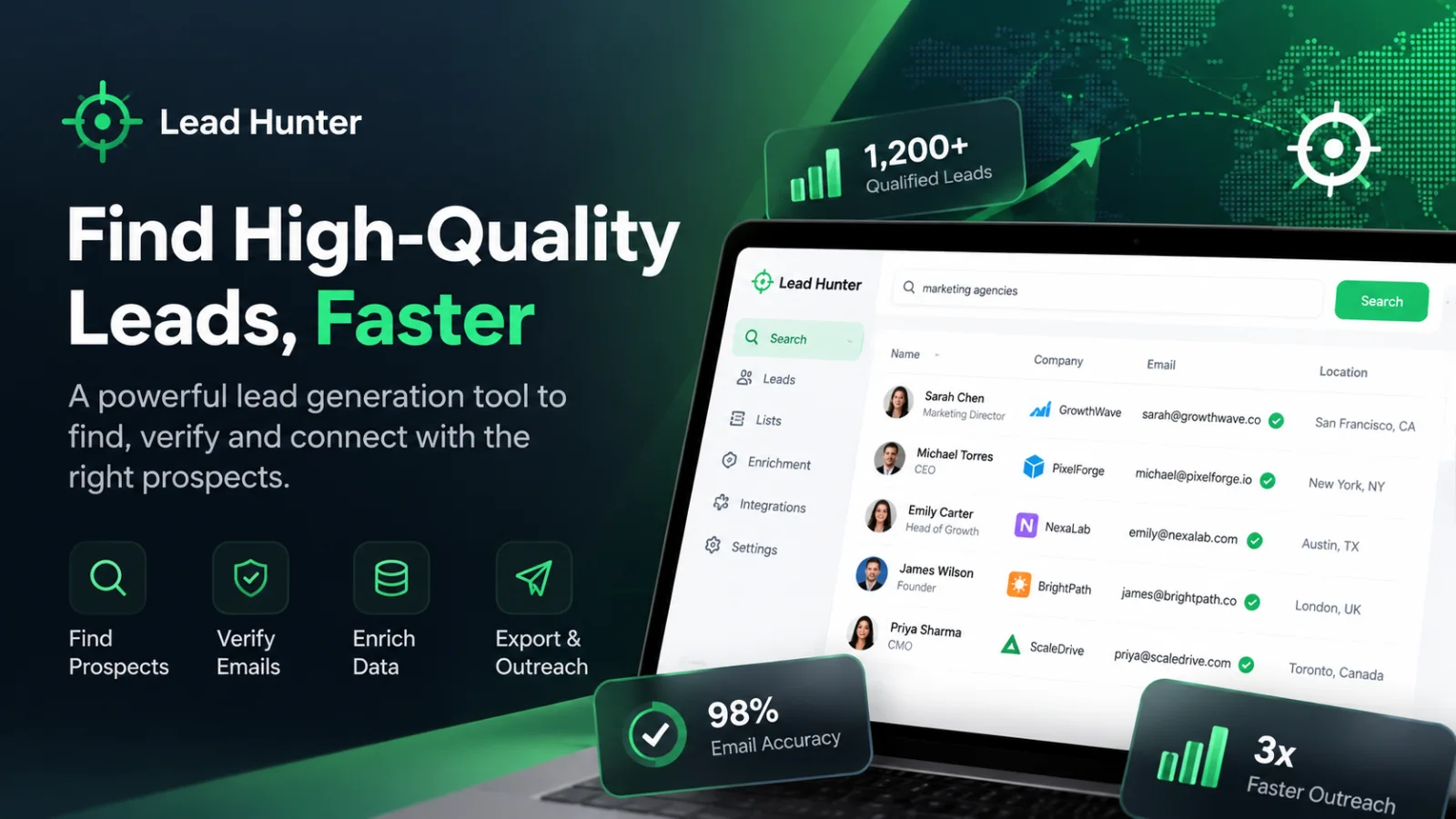
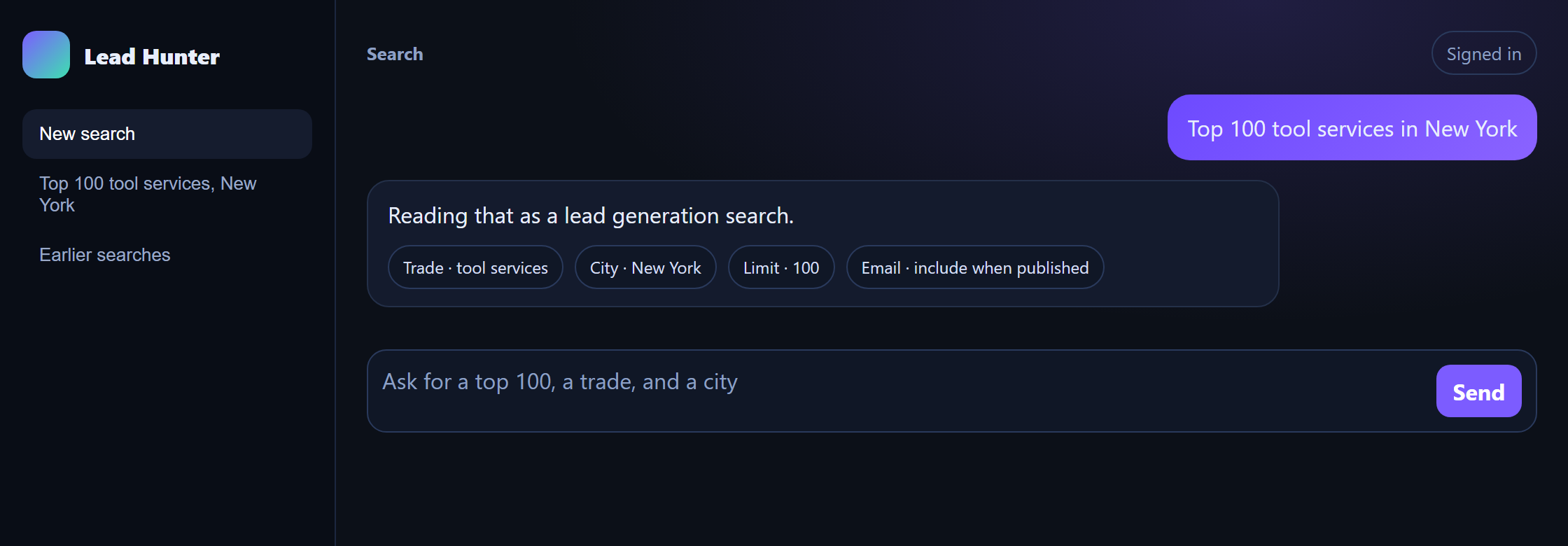
You open Lead Hunter with a sentence you could say across a desk, and you leave with a list of businesses the person who makes the calls can use that week. The sentence this study keeps returning to is “Top 100 tool services in New York”. Lead Hunter reads that as a trade, a city, and a count of 100. The table that comes back holds up to 100 businesses. Each row has the name and the place. When the business published a contact email, the row has that email too. You can export the whole table, and the search stays on your account after the laptop is closed.
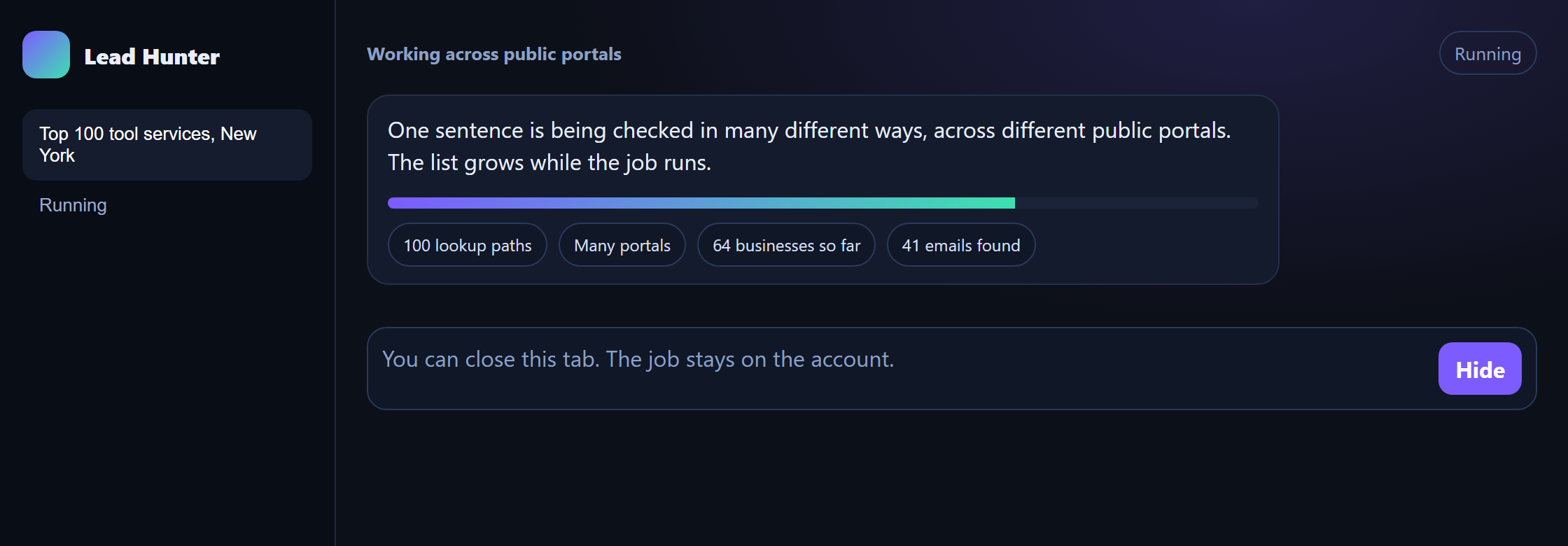
That is the product. You are not buying a file of contacts from someone else, and you are not standing up a research project. You are asking for a working list from public listings. The people on it are businesses that showed up for the trade and the place you named. A phone is on the row when a listing published one. The screens on this page are that search in three moments: the sentence, the job moving, and a finished list where the rows carry a published email. Ten rows on a screen are the start of the hundred. The rest of the list is the same kind of row.
A studio that sells websites can ask for local shops, including shops with no site. A person looking for service firms in one city can ask for the top 100. Both of them are using the same desk. The sentence changes. What you walk away with does not: a list with a clear shape, a sense of progress while it is being built, and a CSV your team can open in the sheet they already use for outreach.
You can hand that file to someone who was not in the room when you typed the sentence. The columns are the ones they need for a first pass: who the business is, where it is, how to reach it, and whether a website turned up. They do not have to reconstruct your morning from a stack of browser tabs. The search record still says what you asked for, so the list and the question stay together.
Who it is for
Lead Hunter is for people who already know the sentence. A web studio looking for local businesses to offer a site. A freelancer who works one city and one or two trades. A small agency that needs a clean list before a week of calls. An in-house marketer looking for stockists or service partners in named places. What they share is a request they can say out loud: a trade, a place, whether a website should matter, and how many rows they can actually work.
The buyer of a first website is often a business that has a name, a place, and a phone, and does not yet have a site you can point at. Finding those businesses is one way to start a sales week. The same desk also answers a wider lead list, such as the top 100 tool services in a city, and puts a published email on the row when one exists. If you sell a first site on most of these calls, you will use the website filter. If you sell something else, you will leave that filter alone and take the wider list. The product does both.
It fits a team of two or three as well as a person working alone. One of you might type the sentence. Another might export the file and start calling. A third might reopen last week’s list when a shop phones back and asks where you found them. Each person signs in as themselves. Your searches stay on your account. A colleague’s searches stay on theirs, and the way you share a list is by handing over the CSV.
It is a poor fit if you want a purchased email list, or a promise that every row will have an address. The list is only as full as the public listings were. A short list from a small town is a real result, and you can see that it is short. You still decide who to call, what to say, and whether this week’s offer is a first site, a redesign, or something else entirely.
The sale you are actually making
Most of the people who use a desk like this are selling something specific to a local business. A small site with a page for the service, a map, a phone number, and a form. A local-search setup. A membership site for a trade group that still has members with no public page. The shop owner is busy. You arrive with a reason to talk, which usually means you already know whether they have a website.
That is why the search is a choice, not a dump of every business in the city. “Dentists in one neighbourhood” is research. “Dentists in that neighbourhood without a website” is a call list. Lead Hunter keeps those apart, and it remembers which one you asked for. The person who exports the file on Thursday is often not the person who typed the sentence on Tuesday. The record should still say which job this was.
You might cover one city first and take work in nearby towns when a referral comes in. A typical week is not “every business”. It is twenty or thirty shops you can actually reach, in trades you know how to serve. The count on the sentence is there so a person who can call twenty shops does not receive two hundred and then lose the afternoon deciding where to start.
The work it replaces
Before a desk like this, the morning started in a public directory. You typed a trade and a city, scrolled, and copied a name and a phone into a sheet. Then you opened another listing to see whether a website was attached. If that page was slow, you left the tab open and moved on. By lunch the browser held a stack of half-read listings, and the sheet held a mix of complete rows and notes nobody fully trusted.
The hard part was not the typing. The hard part was knowing what a row meant the next day. “No site” might mean the directory had no link. It might mean you skipped the check. It might mean the link was a social page and you were unsure whether that counted. The first message depends on that cell. Telling a shop you noticed they have no website, when they do, is a fast way to lose the call.
Long lists made the browser the bottleneck. A search across a whole city could stall the tab. Refreshing lost your place. Closing the laptop for a client meeting threw away work you had not copied yet. There was no status you could ask about later. Yesterday’s search was a tab nobody could reopen, and the person who had the tabs was often on site.
When a second person joined the sales work, the sheet split. One copy lived in email. One lived on a laptop. Both had the same trade. Some rows overlapped and some did not, and the phones did not always match, because each person had copied from a different listing. Files named with the date were the only history, and the newest file won, which failed the moment two people edited on the same day. The question that produced the file was gone. A sheet called “leads-march” did not say whether you had asked for businesses with no website, businesses that have one, or everything you could find.
What you no longer have to spend the morning on
You stop copying phones by hand from page after page. You stop losing a search when the tab closes. You stop arguing, three days later, about whether a row had a website. The sentence becomes the search. The search shows that it is moving. The finished table can be downloaded by the same person later, and a colleague can run their own search without overwriting yours.
The empty cells stay empty for a reason you can explain to the person who calls. If a listing published a phone, the phone is on the row. If it did not, the cell is blank. If a website was found, the row says so. If an email was published, the row carries it. The team learns to trust a column that means what it says, which is what makes the list usable on a busy Monday.
None of this removes the sales work. Someone still has to decide the offer, write the first message, and make the call. Lead Hunter takes the part that used to vanish into tabs: finding the businesses, keeping the question with the list, and giving you a file the rest of the team can open.
One sentence is enough
You sign in and type the way you used to type into a directory, except you can say the filter and the count in the same breath. “Cake shops in one city without a website, 25.” “Dentists in a neighbourhood with a website.” “Hardware stores in the next town.” “Top 100 tool services in New York.” The desk replies with the search it understood, and then with the table. It does not reply with advice about how to sell. The selling stays with you. The desk finds the rows.
You do not have to learn field names to get a useful list. The sentence is read as a trade, a place, a website choice, and a count. In “cake shops in one city without a website, 25”, the trade is cake shops and the count is 25. A quoted phrase is kept whole, so a two-word service is not split into loose words. If the sentence has no trade, you are asked for one. The desk does not guess “restaurant” because yesterday’s search was restaurants.
The place is read the way people name a place: in a city, near a neighbourhood, from a town. A studio often sells inside part of a city rather than across all of it, and the place you typed should be the place that is searched. The place on each row is still whatever the listing published, which may be a street or a fuller address. The city on the search and the place on the row are related, and they are not the same thing. Keeping them distinct is how a neighbourhood search stays a neighbourhood search.
Courtesy words do not change the query. “Please find me some” does not add a filter. A greeting does not start a search. If the sentence is too thin to run, you get a chance to say the trade and the place more plainly, and then the same four pieces are what the search uses. You can read them back before the list grows, and correct them if the desk heard a different city from the one you meant.
A sentence you would actually say
The useful test of the box is whether a salesperson can type into it without a manual. If they already say “tutors in this city, only the ones with no website, about thirty”, that sentence is the product. They should not have to translate it into a form with twenty filters before the morning can start.
You can run a second sentence without deleting the first. Tutors and clinics are two records. Each has its own wording, its own table, and its own export. When a shop calls back next month, you open the search you ran, not a reconstructed memory of which file was newest.
A messy sentence is still your sentence. If you mix a greeting, a trade, and a city, Lead Hunter keeps the trade and the city and lets the rest go. If you ask a question the desk cannot turn into a search, it asks you to name the business type and the place. You stay in the same conversation. You do not lose the morning to a blank screen.
A list of up to 100
The count is part of the ask. One hundred is the top of the list Lead Hunter will bring back for a sentence like the New York example. You can ask for fewer when fewer is what the week can hold. Twenty-five cake shops is a finished job if twenty-five is what you typed. The table stops at the count you set, and it also stops early when the public listings run out. A thin result is shown as a thin result. You can see how many businesses are in the table, so you are not left wondering whether the rest is still coming.
The search looks across public portals, in more than one way, rather than copying the first page of a single directory and calling that a list. While it runs, the table grows. You can watch names arrive instead of staring at a spinner with no end. That matters on a long city search, because directory work is slow and people start a second search when the first one looks frozen. The screen is there so you can tell “still working” from “failed”.
Each row is allowed to hold the business name, the place, a phone when one was published, whether a website was found, and an email when one was published. The columns do not change when the city changes. A search in a large city and a search in a town you have never worked use the same table. What changes is which public listings are tried first. If you name a city in India, listings that cover businesses there are tried first, so the hour is spent where the businesses actually are. You still read one table.
The same business can show up in more than one listing. The list you work from should not make you call them twice under two slightly different names without noticing. Lead Hunter keeps the row tied to the business it found, so the table you export is the table you saw. You can still decide, in your own sheet, to merge two rows if you know they are the same shop. That judgement stays with the person who knows the neighbourhood.
How far the list is meant to go
A hundred rows is a working list for a team, not a database of a whole industry. If you need the top tool services in New York, you ask for that hundred and you work it. If you need a neighbourhood of dentists, you ask for the neighbourhood and a smaller count. The product is sized for the week of calls, which is why the sentence includes the number.
You will sometimes get fewer rows than you asked for. A town with a handful of hardware stores does not become a hundred hardware stores. The honest list is the short one. You can widen the place, change the trade, or run a second search. You should not have to wonder whether the tool hid the rest.
Website and email are separate columns, so “no website” is not confused with “no email found”. A business can have a site and no published email. A business can have neither. The person writing the first message needs those to be different facts, because the message is different. The table keeps them different on purpose.
A published email when one exists
When a business published a contact email, it is on the row. That is the highlight people notice first on a finished list: a column they can actually use, filled from the listing, ready for the person who writes. The New York search on this page is that picture. The rows carry the address that was public. You export them with the rest of the table and the outreach sheet starts from something real.
If no email was published, the cell stays blank. Lead Hunter does not fill one in. A blank is a finished answer, not a gap the tool is still working on. Use the phone, open the site if there is one, or skip the row. The export leaves the same cell empty, so the sheet does not treat a placeholder as a mailbox.
A finished search can still be a hundred names with a hundred emails, when those addresses were public. Another search can be a hundred names and a quieter email column, because the listings never printed an address. Both are the same product. You judge the list by whether the rows match what you asked for, not by whether every cell is full.
The no-website filter makes this easy to see. Ask for businesses without a website and those are the rows. A business that already has a site does not appear in that list. The website cell on the rows you do get says no. There is often no published page to read an email from, so many of those email cells are blank, and the phone is what the call uses. Ask the other way, “with a website”, and the rows say yes for a site, with an email only when one was published. Leave the website words out and you get both, with the yes-or-no column to tell them apart.
Still there after you close the laptop
A long search does not live in the browser tab. Once it is queued, you can close the laptop, go to a meeting, and sign in later. The account shows whether the job is waiting, running, finished, or failed. If it finished, the rows are there. If it is still running, you can see that it is still running, including how many businesses are in the table so far. Yesterday’s search is no longer a tab nobody can reopen.
That is the difference between a tool and a session. Directory search takes time. If the work dies when the lid closes, people go back to copying by hand, because at least the sheet survived lunch. Lead Hunter keeps the job on the account that started it. Opening the account in the evening shows the morning’s list, or the status if the list is not ready yet.
You do not have to sit and watch a hundred-row search finish. Start it, read the status, and do something else. Come back when you have a gap. The progress line is part of the product for the times you do watch: people trust a job they can see moving. A failed job is marked failed, so you can run it again or change the sentence, instead of assuming the empty table is the answer.
History lists the searches on your account. You can reopen last week’s tutors without running them again. The export is still available from that search. A second person, signed in on their own account, does not see your history and cannot download your file. If the team needs the list, you give them the CSV. Sharing is a choice you make, not a side effect of using the same office.
Coming back the next morning
Sign in and the searches you ran are listed with their status. The sentence is still attached, so you can see that Tuesday was “tuition classes, no website, 30” and Wednesday was a different trade. You open the one a shop mentioned on the phone. The table is the table you exported, not a new guess.
If a longer search was still going when you left, the status tells you whether to wait or to read. You do not restart it out of doubt. Restarting was the old habit, from the days when a stalled tab and a finished tab looked the same.
A failed search is still your search. You can read that it failed, look at the sentence, and decide whether to run it again or to narrow the place. The failure does not wipe the fact that you asked. The account keeps the record either way.
A CSV your team can use
Export downloads a CSV of the rows on screen. The columns match the table: name, place, phone, website, email. A blank on screen is a blank in the file. There is no extra score and no suggested address. The file is the handoff into the outreach sheet your team already has.
Open the CSV next to the table once, the first time you use it, and check that they agree. After that, the person who calls can live in the sheet. They add their own columns there: who called, what was said, whether a meeting is booked. Those columns are not Lead Hunter’s job. The desk keeps the search result. The sheet keeps the sales work. A careless edit in the sheet does not rewrite the search you may need again next month.
The person who exported on Thursday can reopen the same table on Friday without trusting that the download is still in someone’s inbox. Downloading again does not start a new search. If they edited the CSV, Lead Hunter does not try to pull those edits back. That split is how a small team avoids two copies of the truth. The list of businesses is the search. The story of the calls is the sheet.
Because the file matches the table, including the blanks, the person who was not in the room can trust it. They do not have to ask whether an empty email means “not found” or “still loading”. They can sort, filter, and assign rows in the tool they already know. Lead Hunter’s part of the handoff is done when the file and the screen say the same thing.
A normal working day
Tuesday starts with a sign-in. The account is yours, so the searches from last week are already listed. You type “tuition classes in this city without a website, 30”. Lead Hunter shows you the trade, the city, the no-website filter, and the count. You let it run. Progress moves, and rows arrive with names, places, phones where a phone was published, website set to no, and emails left blank where no address was published.
You export the CSV, open it in the sheet the caller uses, and add a column for notes. The first calls happen while you still remember why you picked tuition classes this week. At noon you close the laptop for a visit that was booked from an earlier list. Before you leave, you start a longer search for another trade. It is queued on your account. It does not depend on the lid of the laptop.
In the evening you sign in from the studio. The morning’s tuition search is still there, with its thirty rows or however many the listings actually had. The longer job is either finished or still running, and the status says which. Your colleague’s searches from the same day are not in your list. If they need the tuition file, you send the CSV. If they have their own trade to cover, they sign in as themselves and type their own sentence.
Wednesday you do not rebuild Tuesday. A shop from the tuition list calls back. You open that search, read the row, and see the phone you used. Later you run “dentists in the same city with a website”, because this week’s other offer is for businesses that already have a site and might want a clearer one. That list is a second record. The tuition rows are untouched.
By Friday the week is a set of searches with sentences you can still read, files the caller has been working, and a status on anything that was too long to watch. Nobody is reconstructing the list from tabs. The argument about whether a row had a website has somewhere to go: the column on the search you both can point at, once the CSV has been shared.
What the caller does with the file
The caller does not need to know how the list was gathered. They need the name, the place, a way to reach the business, and a clear website yes or no so the first sentence of the call is true. They work down the sheet, mark who answered, and book the visits. When a number is wrong, they note it in the sheet. Lead Hunter does not become the place where call notes live.
If a row has a blank email, they call or they skip. They do not wait for the cell to fill itself in later. The list they were given is the list. A later search is a new search, with its own sentence, if the team decides the first one was the wrong trade or the wrong size of place.
Two callers can split one CSV without sharing a login. One takes the first half of the sheet, one takes the second. They can see, from the sentence at the top of the search, that both halves came from the same ask. That is enough coordination for a small studio. A shared login, with two people editing one history, is the mess this product stays out of.
What stays in your control
You choose the sentence. Trade, place, website filter, and count are yours, said in ordinary language. You choose whether this search is a call list of businesses with no website, a list of businesses that already have one, or a wider set you will sort yourself. You choose how many rows the week can hold, up to 100.
You choose who has an account. Each person sees their own history, their own jobs, and their own exports. There is no shared inbox of searches behind the screen. If a list should move from one person to another, the CSV is the way it moves. You can run as many searches as you need on your own account without deleting the earlier ones.
You choose what happens after the file lands. Who to call first, what the offer is, which blank rows to skip, which neighbourhood to visit in person: that work stays in the studio. Lead Hunter does not write the email, book the meeting, or tell you the list will turn into revenue. It gives you the rows that match the sentence, and it keeps them until you come back.
You can also choose to stop. A search you do not need anymore simply sits in history until you ignore it. It does not keep mailing anyone, because this product does not mail anyone. The next action, if there is one, is a person using the phone or the email that was published. That boundary is what keeps the desk small enough for a studio to trust.
A second person, a second list
When someone new joins the sales work, they get their own sign-in. They learn the same kind of sentence the rest of you already use. Their first search does not overwrite yours, and yours does not appear in their history. You compare notes by comparing files, which is visible, instead of comparing two edits inside one login.
If you both need the same neighbourhood, you can both search it. You may get the same businesses, because the listings are public. What you will not get is a surprise rewrite of the other person’s table. Each account holds the search that account ran.
A shared office laptop is fine if the next person signs in as themselves. The lists do not merge because the computer is the same. Signing out is the handoff. The next morning, each person finds their own work where they left it.
Built with
Lead Hunter is a Python service behind a React screen, with MySQL holding the account, the searches, and the rows, and background jobs carrying a long run after the browser is closed. Those are the pieces a technical partner would recognise. You do not operate them to get a list. You sign in, type the sentence, and read the table.
The screen is the conversation and the progress. The service reads the sentence, talks to public listings, and writes the rows. A long request is queued so it can finish without the tab. The database is why Tuesday’s search is still there on Wednesday. Nothing in that stack changes the rule of the table: up to 100 businesses, a published email when one exists, a blank when it does not, and a CSV that matches what you saw.
A product in this shape, from TechMamba
Lead Hunter is the kind of product TechMamba builds. A person can explain it in a sentence, a team can use it on a Tuesday, and the screen shows the work instead of hiding it. The list is the point. The account is how the list survives the day. The CSV is how the list leaves the building.
If you want a product in this shape, bring the sentence your people already say. Tell us who types it, who calls from the file, and what a row must contain before anyone trusts it. We will map the screens around that: the ask, the progress, the table, the export, and the history on the account. You can walk a first version with a trade and a city you already know, on two sign-ins, and see whether the file is one you would hand to a caller.
We will not invent a client story or a revenue number to make the page louder. The invitation is simpler. If your week still starts in a directory and ends in a sheet nobody can reopen, this is a brief we know how to take. Start with the sentence. We will build the desk that answers it.
Questions worth asking before you brief it
A useful first call is short. Who needs an account? What may a row contain? What should happen when a listing has no email? Do you need the no-website filter, the with-website filter, or both? How many rows can the caller actually work, and is 100 the ceiling you want to keep? Which cities do you sell in, so the first test uses a place you can judge by eye?
Then run the pass yourself. Sign in. Type a sentence a salesperson would actually say. Confirm the trade, the place, the website choice, and the count. Watch the progress until the table has rows. Read one row and check that a missing email is blank. Export the CSV and open it beside the table. Sign out, sign in again, and open the same search from history. Sign in as a second person and confirm the first search is absent. If that pass feels like your week, the brief is the right shape.
Bring the awkward cases too. A neighbourhood rather than a whole city. A trade whose name is two words. A town where you expect a short list. A sentence that forgets the place, so you can see the desk ask for it. The product should be boring in those moments. Boring is what you want when the caller is about to trust the file.
TechMamba can sit in that conversation as the studio that has already shipped this desk. You do not have to describe background jobs or databases to be taken seriously. Describe the Tuesday you want. We will tell you which parts of Lead Hunter already match it, and which parts of your week would need their own decisions before anyone builds.
How a team settles in
The first week is usually one person and one trade they know well. They run a sentence they have typed into a directory a dozen times, export the CSV, and compare it with the sheet they would have built by hand. The comparison is the training. Where the rows match what they already believe about the neighbourhood, they start calling. Where a row surprises them, they open the place and the phone and decide. They are not asked to trust a score.
The second week a colleague gets a sign-in. They take a different trade so the two lists do not have to be merged on day one. They learn the same habits: read the sentence back, watch the count, export, leave call notes in the sheet. By the end of that week the studio has two histories and a way to share a file, which is more coordination than a shared spreadsheet ever gave them.
After that, the desk becomes part of planning the week rather than a special effort. Monday’s sentence is chosen because of the offer you want to make, not because the directory is where you always start. A long search can be started before a site visit. A short one can be run while someone waits on hold. The product earns its place by being there when you come back, with the same rows you remember.
You will still have mornings that belong to the phone. Lead Hunter does not make the calls go better by itself. It makes the list ready, so the morning can be about the conversation. That is the shift a director notices: less time reconstructing where yesterday’s names came from, more time on the shops that match this week’s offer.
A city you know, and a city you do not
Start the first serious test in a place you can judge. If you sell in one city, use that city and a trade you have already called. You will know whether the names feel like the market. A list that looks plausible to a stranger and wrong to you is not ready to hand to a caller.
When a referral pulls you into a town you have never searched, use the same kind of sentence and expect to read the result more carefully. Public listings are uneven. A short table may be the truth. Widen the area only if you meant to. The columns stay familiar, which is what makes an unfamiliar town workable: you already know how to read a row.
Keep one search you trust as the example for anyone new. “This is what a finished tuition list looks like. This is the CSV. This is where notes go.” People learn the desk from a list they can recognise, faster than they learn it from a tour of settings.
What good looks like on the screen
Good looks quiet. A sentence you recognise. A status that changes while the job runs. A table whose columns you can explain to a caller in one minute. An email that is either a real published address or a blank. A CSV that matches. A history that shows your searches and not anyone else’s.
You should be able to point at a row and say why it is there. It matched the trade, the place, and the website choice you asked for. You should be able to point at a missing row and say it was the wrong kind of business for this search, or that the listings did not have it. The screen does not need a second story about how clever the search was. The list is the story.
The progress line earns its keep on the long ones. A hundred tool services in a large city is not instant. If you can see the count climbing, you wait. If the status says failed, you stop waiting and decide. If it says finished, you export. Those three moments are the product, more than any setting hidden behind them.
Over a month, good looks like a folder of searches you can reopen by the sentence, and a caller who stops asking “which file is the real one?”. The real one is the search on the account, exported when the team needs it. Everything else is notes on top of that file, kept in the sheet, where notes belong.